Back in March 2012, I announced that the F# Empty WPF project template had been enhanced to include a type provider from the FSharpx type providers collection. Today, another evolution of the F# Empty WPF template has occurred. The FSharpx.TypeProviders.Xaml type provider has been replaced with Reed Copsey's FsXaml for WPF type provider.
Building a Simple Example:
It's very easy to get started with the latest version of the template as well as FsXaml. Here the steps to create an overly simple example with the new version of the template, FxXaml and FSharp.ViewModule.Core (which is also inclueded in the template):
1. Create a new project with the latest version of the F# Empty Windows App (WPF) template.
2. Build the project and Enable the type provider when requested to do so. You can now run the project, which at this point simply displays a blank screen.
3. Open the MainWindow.xaml.fs file and replace the contents with the following:
4. Open the MainWindow.xaml file add the following to the Grid element:
After this change, the MainWindow.xaml file will look something like the following with one small different depending on what you named your project:
For additional examples checkout the demos in the FsXaml GitHub repo.
Showing posts with label Project Templates. Show all posts
Showing posts with label Project Templates. Show all posts
Sunday, November 30, 2014


Monday, July 14, 2014
Improvements to the F# Web Templates
There has been quite a bit of activity with various F# web templates over the last few months. This post will cover several of these activities.
ServiceStack Templates:
Kunjan Dalal and I have released version 2 of the ServiceStack templates. This version includes 4 new templates that target version 4 of ServiceStack. You can find the latest at http://visualstudiogallery.msdn.microsoft.com/278caff1-917a-4ac1-a552-e5a2ce0f6e1f.
MVC 5 Templates:
There are now 2 new "empty" templates available in the latest release of the package available at http://visualstudiogallery.msdn.microsoft.com/39ae8dec-d11a-4ac9-974e-be0fdadec71b. There have also been several fixes and enhancements provided by various members of the F# community.
- Patrick McDonald improved the default serialization of the MVC5 and Web API templates so that an "@" character is no not appended to the end of JSON property names.
- Functionality has been added to appropriately handle cancellation of a template creation request
- The necessary changes have been made to allow NuGet restore to work for projects created from this template
Web Item Templates:
Last but not least, the Web Item Templates have been enhanced to support Visual Studio Express 2013 for Web.
Monday, January 13, 2014
A Project Template Wizard Via NuGet
It's hard to believe that more than a month has gone by since the pure F# MVC 5/Web API 2 and pure F# Nancy templates were released. One of the known issues with these templates was that they didn't appear in the Visual Studio Online Templates search. I'm happy to say that this issue has been resolved.

The approach taken to address this issue involved a custom implementation of IWizard and a simple WPF dialog. While I've created several of these in the past, until now it never seemed practical to create anything that could easily be reused.
There is now a NuGet package with ID MultiProjectWizard that can be used to provide multiple templates in a single VSIX without having to give up Online Template search functionality. Here are the steps (Note: These steps assume that you are using SideWaffle, though this NuGet package has no dependency on SideWaffle):
1. Setup your solution as if it were a multi-project template by placing each template in it's own folder with the *.vstemplate file named as MyTemplate.vstemplate. Include an _definitions folder in the parent folder and create a <language>.vstemplate file within it. See https://github.com/fsharp/FSharpCommunityTemplates/tree/master/VisualStudio/Mvc5/TemplatePack/ProjectTemplates/Web for an example of how to setup the folder structure.
2. Make the XML in the _defintiions/<language>.vstemplate file similar to the following and update the TemplateData appropriately.
3.Update the WizardData/Projects child elements appropriately. Each element represents one of the templates that was included in it's own folder in step #1. Here's a description of the attributes for the ProjectInfo element:
4. Install the MultiProjectWizard NuGet package. Note: This package includes DLLs such as EnvDTE and EnvDTE80. If your project already includes these DLLs, then you may need to remove the duplicate References after installing this package.
5. Lastly, add the MultiProjectDialog.dll and MultiProjectTemplateWizard.dll files as Assets to the source.extension.manifest file (as an Assembly with "File on filesystem" as the source):

You can now try out your template. If all has gone well, you'll see a screen that looks something like this:

The approach taken to address this issue involved a custom implementation of IWizard and a simple WPF dialog. While I've created several of these in the past, until now it never seemed practical to create anything that could easily be reused.
There is now a NuGet package with ID MultiProjectWizard that can be used to provide multiple templates in a single VSIX without having to give up Online Template search functionality. Here are the steps (Note: These steps assume that you are using SideWaffle, though this NuGet package has no dependency on SideWaffle):
1. Setup your solution as if it were a multi-project template by placing each template in it's own folder with the *.vstemplate file named as MyTemplate.vstemplate. Include an _definitions folder in the parent folder and create a <language>.vstemplate file within it. See https://github.com/fsharp/FSharpCommunityTemplates/tree/master/VisualStudio/Mvc5/TemplatePack/ProjectTemplates/Web for an example of how to setup the folder structure.
2. Make the XML in the _defintiions/<language>.vstemplate file similar to the following and update the TemplateData appropriately.
3.Update the WizardData/Projects child elements appropriately. Each element represents one of the templates that was included in it's own folder in step #1. Here's a description of the attributes for the ProjectInfo element:
- folderName = This is the name of the folder created in step #1 that is associated with the template. The IWizard implementation will look into this folder and try to find a file with a name of MyTemplate.vstemplate.
- displayText = This is the text that will display in the WPF window for this particular template.
- icon = There are two options for icon: "FSharp" and "Generic". If you choose F#, then the icon for that template with include the text "F#", else it will not.
4. Install the MultiProjectWizard NuGet package. Note: This package includes DLLs such as EnvDTE and EnvDTE80. If your project already includes these DLLs, then you may need to remove the duplicate References after installing this package.
5. Lastly, add the MultiProjectDialog.dll and MultiProjectTemplateWizard.dll files as Assets to the source.extension.manifest file (as an Assembly with "File on filesystem" as the source):
You can now try out your template. If all has gone well, you'll see a screen that looks something like this:
Tuesday, December 31, 2013
Simple.Web and ServiceStack Templates
Back in November I blogged about a new home for the F# community project templates. Since that time there has been a flurry of activity in this new home. Two of the most recent additions include a template for creating Simple.Web apps and one for creating a self-hosted ServiceStack service. Both of these templates were built with the help of SideWaffle.
Simple.Web:
Simple.Web is a REST-focused, object-oriented Web Framework for .NET built by Mark Rendle. James D'Angelo recently published a pure F# template that helps you get started with Simple.Web. You can find it at http://visualstudiogallery.msdn.microsoft.com/bbec75fa-0f31-47e9-a8ce-c301edb2fa4b.

ServiceStack:
ServiceStack is a framework for building simple and fast web services on .NET and Mono. Kunjan Dalal and I recently released a template for kick-starting a self-hosted ServiceStack service. Other ServiceStack template options will be included in this package soon, so stay tuned.

Find Out More:
If you want to learn more about web development with F#, head over to FSharp.org. If you'd like to get involved, clone https://github.com/fsharp/FSharpCommunityTemplates and start hacking. If you're new to SideWaffle, I also recommend watching the introduction video at http://sidewaffle.com/. It's now easier than ever before to create a template with SideWaffle.
As always, feel free to reach to me if you have any questions.
Simple.Web:
Simple.Web is a REST-focused, object-oriented Web Framework for .NET built by Mark Rendle. James D'Angelo recently published a pure F# template that helps you get started with Simple.Web. You can find it at http://visualstudiogallery.msdn.microsoft.com/bbec75fa-0f31-47e9-a8ce-c301edb2fa4b.
ServiceStack:
ServiceStack is a framework for building simple and fast web services on .NET and Mono. Kunjan Dalal and I recently released a template for kick-starting a self-hosted ServiceStack service. Other ServiceStack template options will be included in this package soon, so stay tuned.
Find Out More:
If you want to learn more about web development with F#, head over to FSharp.org. If you'd like to get involved, clone https://github.com/fsharp/FSharpCommunityTemplates and start hacking. If you're new to SideWaffle, I also recommend watching the introduction video at http://sidewaffle.com/. It's now easier than ever before to create a template with SideWaffle.
As always, feel free to reach to me if you have any questions.
Sunday, December 8, 2013
A Few Other Template Additions and Changes of Interest
As you've probably noticed, there has been a lot of recent activity around the F# templates that have been created by various members of the F# community (here are some recent posts on some of this activity: MVC 5 Templates and F# Web Item Templates). I wanted to point out a few other new or updated templates that may be of interest to you.
Nancy Templates:
There are now 9 first-class F# Nancy templates available on Visual Studio Gallery. Here's a screenshot of what it looks like once the F# Nancy Templates package is installed:

MSTest Project Template:
We've added an AfterBuild step with the help of the MSBuild Extension Pack to the MSTest Project Template so that binding redirects are appropriately handled in both VS2012 and VS2013.
FSharpTest Template:
Jack Fox has updated his FSharpTest template to support VS2013 in addition to the previously supported VS2012. You can read more information about the FSharpTest template at http://jackfoxy.com/fsharptest/.
Nancy Templates:
There are now 9 first-class F# Nancy templates available on Visual Studio Gallery. Here's a screenshot of what it looks like once the F# Nancy Templates package is installed:
MSTest Project Template:
We've added an AfterBuild step with the help of the MSBuild Extension Pack to the MSTest Project Template so that binding redirects are appropriately handled in both VS2012 and VS2013.
FSharpTest Template:
Jack Fox has updated his FSharpTest template to support VS2013 in addition to the previously supported VS2012. You can read more information about the FSharpTest template at http://jackfoxy.com/fsharptest/.
Wednesday, November 6, 2013
A New Home for the F# Community Project Templates

While at the Progressive F# Tutorials last week Don Syme and I worked together to create a new home for the community F# project templates. They can now be found under the F# Open Source Community GitHub org at https://github.com/fsharp/FSharpCommunityTemplates.
We would love to have you add to these templates. Simply follow the instructions in the readme file and submit a pull request.
Sunday, July 7, 2013
New Angular.js Option in the F#/C# MVC 4 SPA Project Template
There's a new addition to the F#/C# MVC 4 SPA project template family. In addition to the previously supported options of Backbone.js and Knockout.js, you can now create a template with Angular.js as the JavaScript framework.
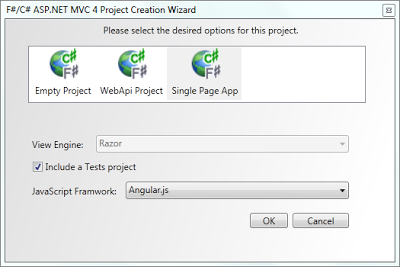
Angular.js is an MV* JavaScript framework that allows you to build web applications ina declarative style. Since F# also focuses on more of a declarative style, Angular.js + F# are a great combination.
The Angular related JS that comes out of this template is primarily isolated to the following files: scripts\app\router.js, scripts\controllers\contactDetailController.js, and scripts\controllers\contactCreateController.js. The JS for each of these is shown below:
router.js:
contactDetailController.js:
contactCreateController.js:
Enjoy!

Angular.js is an MV* JavaScript framework that allows you to build web applications in
The Angular related JS that comes out of this template is primarily isolated to the following files: scripts\app\router.js, scripts\controllers\contactDetailController.js, and scripts\controllers\contactCreateController.js. The JS for each of these is shown below:
router.js:
contactDetailController.js:
contactCreateController.js:
Enjoy!
Monday, October 15, 2012
Knockout.js Added to the F#/C# MVC 4 Single Page Application Template
Two weeks I announced a new Single Page Application (SPA) template with Backbone.js in the F# C# MVC 4 Visual Studio extension. Last week an example of a SPA with Knockout.js was provided. I bet you can guess what's coming...
Today, you can get version 1.13 of the F# C# MVC 4 extension, which gives you the option to choose between Backbone.js and Knockout.js when creating a F#/C# SPA.
The new project creation screen looks like this:

If you would like to see additional JavaScript frameworks included as options, let me know.
You can find information on the Knockout.js version in this post and information on the Backbone.js version in this post. Note: A C# only version and a PHP version of the Backbone.js example is available at https://github.com/dmohl/FsWebSpa-Backbone/downloads.
Today, you can get version 1.13 of the F# C# MVC 4 extension, which gives you the option to choose between Backbone.js and Knockout.js when creating a F#/C# SPA.
The new project creation screen looks like this:

If you would like to see additional JavaScript frameworks included as options, let me know.
You can find information on the Knockout.js version in this post and information on the Backbone.js version in this post. Note: A C# only version and a PHP version of the Backbone.js example is available at https://github.com/dmohl/FsWebSpa-Backbone/downloads.
Sunday, September 30, 2012
Single Page Application Template Now Available
Version 1.12 of the F# C# MVC 4 Visual Studio extension now includes a Single Page Application (SPA) template with the Backbone.js JavaScript framework. The template works in VS2010 as well as VS2012 (including VS2012 Express for Web).
To use the new template, simply pull down the latest by following the direction from one of my previous posts or by clicking the download button on Visual Studio Gallery. Once you have installed the Visual Studio extension, you will see the following screen when creating a new F# and C# Web Application (ASP.NET MVC 4) from the Visual F# | ASPNET project template category.


If you wish to learn more about the solution that is generated from this new template, see my previous post.
To use the new template, simply pull down the latest by following the direction from one of my previous posts or by clicking the download button on Visual Studio Gallery. Once you have installed the Visual Studio extension, you will see the following screen when creating a new F# and C# Web Application (ASP.NET MVC 4) from the Visual F# | ASPNET project template category.

Highlights of the F# and C# project structure are shown below:
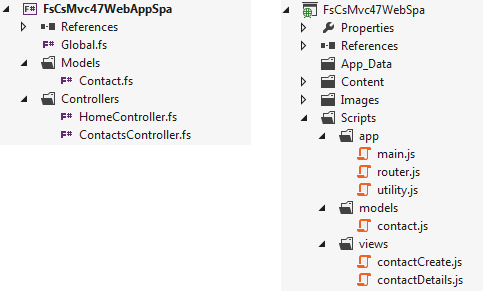
If you wish to learn more about the solution that is generated from this new template, see my previous post.
Monday, June 4, 2012
F#/C# ASP.NET MVC 4 Template for Visual Studio 2012 RC
The F#/C# ASP.NET MVC 4 template has been updated to support ASP.NET MVC 4 RC and Visual Studio 2012 RC. You will need to install the release candidate of ASP.NET MVC 4 to use this updated version of the template. The install can be found at http://www.asp.net/mvc/mvc4.
As with the previous release, the F#/C# ASP.NET MVC project template supports ASPX and Razor versions of an empty ASP.NET MVC 4 project template as well as a Razor version of the ASP.NET Web API project template. The templates work on both VS2010 and VS2012 RC.

As with the previous release, the F#/C# ASP.NET MVC project template supports ASPX and Razor versions of an empty ASP.NET MVC 4 project template as well as a Razor version of the ASP.NET Web API project template. The templates work on both VS2010 and VS2012 RC.

Monday, March 26, 2012
A Nice Addition to the Empty WPF F# Template
A few days ago Steffen Formann announced a Xaml type provider that he and Johann Deneux have created that makes writing WPF apps in F# very easy. This type provider allows strongly typed access to the XAML, effectively providing the missing piece to allowing full F# WPF designer support. I've now updated the Empty WPF F# Template to include this type provider.
To use it, all you have to due is download/install the latest version of the F# Empty Windows App (WPF) template in VS11. This will generate an F# project with all the needed WPF assembly references. It also automatically installs the FSharpx.TypeProviders NuGet package and provides the starting point for creating WPF apps with the new Xaml type provider.
Here's a screenshot that's pretty similar to what Steffen showed in the announcement post. Note: The button and label were manually added after creating the project from the updated template.

To use it, all you have to due is download/install the latest version of the F# Empty Windows App (WPF) template in VS11. This will generate an F# project with all the needed WPF assembly references. It also automatically installs the FSharpx.TypeProviders NuGet package and provides the starting point for creating WPF apps with the new Xaml type provider.
Here's a screenshot that's pretty similar to what Steffen showed in the announcement post. Note: The button and label were manually added after creating the project from the updated template.

One other piece that can be helpful when creating WPF apps in F# is the XAML related item templates (i.e. Page, User Control, Window, etc). Item templates are provided via the F# XAML Item Templates extension found at http://visualstudiogallery.msdn.microsoft.com/06c6ece1-2084-4083-a0f7-934fce9d22fb.
Monday, February 27, 2012
Razor Added to the F#/C# ASP.NET MVC 3 Internet Project Template
There's a new version of the F#/C# ASP.NET MVC 3 internet Project Template. This version allows you to choose between the ASPX and Razor view engines.
Here's how to use it:
1. Install version 1.6+ of the project template by searching for it on Visual Studio Gallery and/or updating a version that you had previously installed.
2. Create a new project.
3. You will now see a dialog box similar to what is shown below:

While it's certainly not required in order to use this template, you can see the full source on my GitHub.
Here's how to use it:
1. Install version 1.6+ of the project template by searching for it on Visual Studio Gallery and/or updating a version that you had previously installed.
2. Create a new project.
3. You will now see a dialog box similar to what is shown below:

While it's certainly not required in order to use this template, you can see the full source on my GitHub.
Monday, February 6, 2012
Another Way To Kick-start F# WPF Apps
Over the last few years I've announced a number of project templates that are available on Visual Studio Gallery. A few of these have provided ways to kick-start F# WPF apps. I talked about one of these templates here. While these are nice for getting acquainted with building WPF apps in F# and/or F#+C#, the files needed for the included sample app may become a bother once you have a few of these apps under your belt. Because of this, I've released an F# only Empty WPF project template (an F#/C# Empty WPF template will likely be coming soon).
To get the new template, do the following:
1. In Visual Studio 2010 or 11, navigate to File -> New and select Online Templates (or just Online if using VS11).
2. Search for "Daniel Mohl" or "F# Empty Windows App" as shown below:

3. Select the template, click OK, and agree to the install.
While it's certainly not required to use the template, you can find the full source on my GitHub.
To get the new template, do the following:
1. In Visual Studio 2010 or 11, navigate to File -> New and select Online Templates (or just Online if using VS11).
2. Search for "Daniel Mohl" or "F# Empty Windows App" as shown below:

3. Select the template, click OK, and agree to the install.
While it's certainly not required to use the template, you can find the full source on my GitHub.
Thursday, December 1, 2011
Building an ASP.NET MVC 4 Solution with F# and C#
There is a new project template available on Visual Studio Gallery for creating ASP.NET MVC 4 solutions with F# and C#. The current release of this project template allows creation of an empty ASP.NET MVC 4 web application (either ASPX or Razor), a F# project for controllers/models/etc., and an optional F# project that can be used to contain unit tests. The project creation wizard dialog box is shown below:

In the future, this template will be extended to include at least one additional project type.
To get the template, do the following (Note: Visual Studio 2010/11 Professional (or above) is required to use this template.):
1. In Visual Studio, navigate to File | New and select Online Templates.
2. Search for "fsharp mvc" and select the F# C# MVC 4 project template (see below):

The solution that was used to build this template can be found at https://github.com/dmohl/FsCsMvc4Template.

In the future, this template will be extended to include at least one additional project type.
To get the template, do the following (Note: Visual Studio 2010/11 Professional (or above) is required to use this template.):
1. In Visual Studio, navigate to File | New and select Online Templates.
2. Search for "fsharp mvc" and select the F# C# MVC 4 project template (see below):

The solution that was used to build this template can be found at https://github.com/dmohl/FsCsMvc4Template.
Thursday, November 24, 2011
Building F# Solutions in Visual Studio 11
I love to learn about new technology, seek to continually improve, and always look for ways to make things easier. I then do all that I can to share the knowledge, code, and/or tools that help to achieve these goals. With these goals in mind, I've joined with several friends in the creation of a new blogging community named Fresh Brewed Code. I'd strongly recommend keeping a close eye on the other Fresh Brewed Coders, as they will be producing some awesome content. You can see the announcement at http://freshbrewedcode.com/blog/2011/11/23/welcome-to-fresh-brewed-code/.
One of the other ways that I have attempted to achieve the goals mentioned above is through the creation of a number of Visual Studio project and item templates. Over the last several days, there have been updates to almost all of these templates. In this post I'll describe the changes that have been made--most of which have been implemented to allow support for the Developer Preview of Visual Studio 11 and F# 3.0.
I'm sure that you have used Visual Studio Gallery by now, but just in case you haven't yet had the chance, see http://bloggemdano.blogspot.com/2010/08/f-templates-now-on-visual-studio.html for how to get started. A screenshot of the Online templates view from the Developer Preview of Visual Studio 11 is shown below:

ASP.NET MVC:
F# and C# ASP.NET MVC3 - This project template generates the standard ASP.NET MVC 3 template output with separate projects for the view (ASPX in a C# project) and controllers/models (in a F# project). The latest release (version 1.3) adds support for Visual Studio 11 and F# 3.0. You will need to install the ASP.NET MVC 3 Tools Update (see http://www.asp.net/mvc/mvc3 and make sure to download/install the correct version for Visual Studio 10 or Visual Studio 11) to use this template.
F# C# MVC 3 - This is a dynamic project template that generates an empty ASP.NET MVC 3 solution with separate projects for view (C# - either ASPX or Razor), core (F#), and an optional F# project for unit tests. The template is based on the MSDN Magazine article entitled "Authoring an F#/C# VSIX Project Template" which can be found at http://msdn.microsoft.com/en-us/magazine/hh456399.aspx. You will need to install the ASP.NET MVC 3 Tools Update (see http://www.asp.net/mvc/mvc3 and make sure to download/install the correct version for Visual Studio 10 or Visual Studio 11) to use this template. Version 1.1 adds support for Visual Studio 11 and F# 3.0.
WPF:
F# Windows App (WPF, MVVM) - This project template generates a F# WPF solution with logical separation between View, ViewModel, Model, and Repository. The latest release (version 1.8) resolves a few bugs and adds support for Visual Studio 11 and F# 3.0.
F# and C# Windows App (WPF, MVVM) - This is a project template that generates a WPF solution with separation between View (C#), ViewModel (F#), Model (F#), and Repository (F#). The latest release (version 1.7) resolves a few bugs and adds support for Visual Studio 11 and F# 3.0.
Web Service:
F# and C# Web Service (ASP.NET, WSDL) - This is a project template that generates a Web Service (WSDL) solution with separate projects for web (C#), services (F#), and contracts (F#). The underlying technology is Windows Communication Foundation. Version 1.5 adds support for Visual Studio 11 and F# 3.0.
Silverlight:
F# C# Web App (Silverlight) - This project template generates a Silverlight solution with separate projects for View (C#) and Core (F#). The Core project includes logical separation between ViewModel, Model, and RemoteFacade. You should install the Silverlight 4 developer tools and/or the Silverlight 5 developer tools plus the April 2011 F# CTP. Version 1.2 adds support for Visual Studio 11 and includes a template wizard dialog that allows selection of Silverlight version 4 or 5. The determination of whether to display the wizard dialog is triggered off of the installed F# Silverlight client version. It will only display if both 4 and 5 are installed. Note: There are not yet F# 3.0 Silverlight DLLs. Because of this, the current version only support F# 2.0.
F# Web Application (Silverlight) - This F# project template generates a Silverlight project with logical separation between View, ViewModel, Model, and RemoteFacade. You should install the Silverlight 4 developer tools and/or the Silverlight 5 developer tools plus the April 2011 F# CTP. Version 1.4 adds support for Visual Studio 11 and includes a dialog that allows selection of the desired Silverlight Version 4 or 5 (depending on installations). Note: There are not yet F# 3.0 Silverlight DLLs. Because of this, the current version only support F# 2.0.
F# Empty Web Application (Silverlight) - This project template is similar to the F# Web Application (Silverlight) template; however, it does not include all of the example code. You should install the Silverlight 4 developer tools and/or the Silverlight 5 developer tools plus the April 2011 F# CTP. Version 1.1 adds support for Visual Studio 11, removes the C# host application, adds support to generate an HTML test file, and provides functionality to select the desired Silverlight version 4 or 5 (depending on the installation). Note: There are not yet F# 3.0 Silverlight DLLs. Because of this, the current version only support F# 2.0.
F# 2.0 Silverlight Library (for Visual Studio 11) - This is a project template that generates a F# 2.0 Silverlight project. It targets Visual Studio 11 only and will only be needed temporarily. You can read more about this template at http://bloggemdano.blogspot.com/2011/11/f-silverlight-library-template-in.html. Note: There are not yet F# 3.0 Silverlight DLLs. Because of this, the current version only support F# 2.0.
XAML Item Templates:
F# XAML Item Templates - This Visual Studio Extension provides a number of item templates that make working with F# XAML based projects (i.e. the WPF, Silverlight, and/or Windows Phone 7 project templates) much easier. Without these item templates adding new XAML files to one of these projects is a bit of a pain. You have to create a text or xml file, change the extension to .xaml, manually add the default XAML code, and change the Build Action for the .xaml file to Resource. Version 1.1 adds item templates for Windows Phone 7 (I'll talk more about this in a future post) and adds support for Visual Studio 11.
Project Templates That Do Not Currently Support Visual Studio 11:
Since the Developer Preview of Visual Studio 11 does not currently support Windows Phone 7 development, the Windows Phone 7 templates (i.e. C# WP7 with Caliburn.Micro, F# and C# Win Phone App (Silverlight), F# and C# Win Phone List App (Silverlight), and F# and C# Win Phone Panorama) have not yet been updated to support Visual Studio 11. This will be added as soon as a release of Visual Studio 11 is provided that does include this support.
F# and C# Web App (ASP.NET, MVC 2) - There is not currently an ASP.NET MVC 2 install for Visual Studio 11 and I don't anticipate one to ever be provided. Because of this, I have not (and do not intend to) add support for Visual Studio 11 to this project template.
One of the other ways that I have attempted to achieve the goals mentioned above is through the creation of a number of Visual Studio project and item templates. Over the last several days, there have been updates to almost all of these templates. In this post I'll describe the changes that have been made--most of which have been implemented to allow support for the Developer Preview of Visual Studio 11 and F# 3.0.
I'm sure that you have used Visual Studio Gallery by now, but just in case you haven't yet had the chance, see http://bloggemdano.blogspot.com/2010/08/f-templates-now-on-visual-studio.html for how to get started. A screenshot of the Online templates view from the Developer Preview of Visual Studio 11 is shown below:

ASP.NET MVC:
F# and C# ASP.NET MVC3 - This project template generates the standard ASP.NET MVC 3 template output with separate projects for the view (ASPX in a C# project) and controllers/models (in a F# project). The latest release (version 1.3) adds support for Visual Studio 11 and F# 3.0. You will need to install the ASP.NET MVC 3 Tools Update (see http://www.asp.net/mvc/mvc3 and make sure to download/install the correct version for Visual Studio 10 or Visual Studio 11) to use this template.
F# C# MVC 3 - This is a dynamic project template that generates an empty ASP.NET MVC 3 solution with separate projects for view (C# - either ASPX or Razor), core (F#), and an optional F# project for unit tests. The template is based on the MSDN Magazine article entitled "Authoring an F#/C# VSIX Project Template" which can be found at http://msdn.microsoft.com/en-us/magazine/hh456399.aspx. You will need to install the ASP.NET MVC 3 Tools Update (see http://www.asp.net/mvc/mvc3 and make sure to download/install the correct version for Visual Studio 10 or Visual Studio 11) to use this template. Version 1.1 adds support for Visual Studio 11 and F# 3.0.
WPF:
F# Windows App (WPF, MVVM) - This project template generates a F# WPF solution with logical separation between View, ViewModel, Model, and Repository. The latest release (version 1.8) resolves a few bugs and adds support for Visual Studio 11 and F# 3.0.
F# and C# Windows App (WPF, MVVM) - This is a project template that generates a WPF solution with separation between View (C#), ViewModel (F#), Model (F#), and Repository (F#). The latest release (version 1.7) resolves a few bugs and adds support for Visual Studio 11 and F# 3.0.
Web Service:
F# and C# Web Service (ASP.NET, WSDL) - This is a project template that generates a Web Service (WSDL) solution with separate projects for web (C#), services (F#), and contracts (F#). The underlying technology is Windows Communication Foundation. Version 1.5 adds support for Visual Studio 11 and F# 3.0.
Silverlight:
F# C# Web App (Silverlight) - This project template generates a Silverlight solution with separate projects for View (C#) and Core (F#). The Core project includes logical separation between ViewModel, Model, and RemoteFacade. You should install the Silverlight 4 developer tools and/or the Silverlight 5 developer tools plus the April 2011 F# CTP. Version 1.2 adds support for Visual Studio 11 and includes a template wizard dialog that allows selection of Silverlight version 4 or 5. The determination of whether to display the wizard dialog is triggered off of the installed F# Silverlight client version. It will only display if both 4 and 5 are installed. Note: There are not yet F# 3.0 Silverlight DLLs. Because of this, the current version only support F# 2.0.
F# Web Application (Silverlight) - This F# project template generates a Silverlight project with logical separation between View, ViewModel, Model, and RemoteFacade. You should install the Silverlight 4 developer tools and/or the Silverlight 5 developer tools plus the April 2011 F# CTP. Version 1.4 adds support for Visual Studio 11 and includes a dialog that allows selection of the desired Silverlight Version 4 or 5 (depending on installations). Note: There are not yet F# 3.0 Silverlight DLLs. Because of this, the current version only support F# 2.0.
F# Empty Web Application (Silverlight) - This project template is similar to the F# Web Application (Silverlight) template; however, it does not include all of the example code. You should install the Silverlight 4 developer tools and/or the Silverlight 5 developer tools plus the April 2011 F# CTP. Version 1.1 adds support for Visual Studio 11, removes the C# host application, adds support to generate an HTML test file, and provides functionality to select the desired Silverlight version 4 or 5 (depending on the installation). Note: There are not yet F# 3.0 Silverlight DLLs. Because of this, the current version only support F# 2.0.
F# 2.0 Silverlight Library (for Visual Studio 11) - This is a project template that generates a F# 2.0 Silverlight project. It targets Visual Studio 11 only and will only be needed temporarily. You can read more about this template at http://bloggemdano.blogspot.com/2011/11/f-silverlight-library-template-in.html. Note: There are not yet F# 3.0 Silverlight DLLs. Because of this, the current version only support F# 2.0.
XAML Item Templates:
F# XAML Item Templates - This Visual Studio Extension provides a number of item templates that make working with F# XAML based projects (i.e. the WPF, Silverlight, and/or Windows Phone 7 project templates) much easier. Without these item templates adding new XAML files to one of these projects is a bit of a pain. You have to create a text or xml file, change the extension to .xaml, manually add the default XAML code, and change the Build Action for the .xaml file to Resource. Version 1.1 adds item templates for Windows Phone 7 (I'll talk more about this in a future post) and adds support for Visual Studio 11.
Project Templates That Do Not Currently Support Visual Studio 11:
Since the Developer Preview of Visual Studio 11 does not currently support Windows Phone 7 development, the Windows Phone 7 templates (i.e. C# WP7 with Caliburn.Micro, F# and C# Win Phone App (Silverlight), F# and C# Win Phone List App (Silverlight), and F# and C# Win Phone Panorama) have not yet been updated to support Visual Studio 11. This will be added as soon as a release of Visual Studio 11 is provided that does include this support.
F# and C# Web App (ASP.NET, MVC 2) - There is not currently an ASP.NET MVC 2 install for Visual Studio 11 and I don't anticipate one to ever be provided. Because of this, I have not (and do not intend to) add support for Visual Studio 11 to this project template.
Saturday, November 12, 2011
F# Silverlight Library Template in Visual Studio 11
If you have played with Visual Studio 11 much, you may have noticed that there isn't a F# Silverlight Library template out-of-the-box. This is presumably due to the fact that the current release of Visual Studio 11 is just a developer preview and there doesn't appear to be a version of F# 3.0 for Silverlight just yet. However, this doesn't stop you from creating Silverlight projects that target F# 2.0 in Visual Studio 11. In order to help you do this, I've created a project template that allows you to create a F# 2.0 Silverlight Library in Visual Studio 11. You can download the VSIX from here.
The following prerequisites exist for using this library:
1. Download and install the VS2011 Preview with F# 3.0 (see http://blogs.msdn.com/b/fsharpteam/archive/2011/09/14/f-3-0-developer-preview-now-available.aspx for more information).
2. Download and install the Microsoft F#, April 2011 CTP from http://www.microsoft.com/download/en/details.aspx?id=11100.
Wednesday, November 9, 2011
New F# Windows Phone Library Project Template
There is a new F# Windows Phone Library project template now available on Visual Studio Gallery. This project template allows you to add a new F# library project to a Windows Phone solution rather than having to start with one of the solution templates that is initialized with both a C# and F# project.
As an example, you could easily build the F# and C# Win Phone App (Silverlight) solution by doing the following:
1. Create a new C# Windows Phone Application (Silverlight).
2. Add a new F# Windows Phone Library project to the solution.
3. Add a new XML file to the F# project named MainPage.xaml.
4. Add content to the MainPage.xaml file as shown here (also change the Build Action option to Resource and the Copy to Output Directory option to Copy always).
5. Add the code from here to the File1.fs file.
6. Delete the MainPage.xaml and associated code-behind file from the C# project.
7. Change the App.xaml.cs code in the C# project to what is shown here (Note: You'll likely need to change the namespace).
8. Change the App.xaml code in the C# project to what is shown here (Note: You'll likely need to change the namespace).
9. Edit the properties of the C# project and change the Startup object drop down to the *.AppHost object.
10. Edit the WMAppManifest.xml file and change:
As an example, you could easily build the F# and C# Win Phone App (Silverlight) solution by doing the following:
1. Create a new C# Windows Phone Application (Silverlight).
2. Add a new F# Windows Phone Library project to the solution.
3. Add a new XML file to the F# project named MainPage.xaml.
4. Add content to the MainPage.xaml file as shown here (also change the Build Action option to Resource and the Copy to Output Directory option to Copy always).
5. Add the code from here to the File1.fs file.
6. Delete the MainPage.xaml and associated code-behind file from the C# project.
7. Change the App.xaml.cs code in the C# project to what is shown here (Note: You'll likely need to change the namespace).
8. Change the App.xaml code in the C# project to what is shown here (Note: You'll likely need to change the namespace).
9. Edit the properties of the C# project and change the Startup object drop down to the *.AppHost object.
10. Edit the WMAppManifest.xml file and change:
<DefaultTask Name ="_default" NavigationPage="MainPage.xaml"/>
to
<DefaultTask Name ="_default"/>
11. Finally, add a reference to the F# project, build, and test.
Saturday, October 1, 2011
New F#/C# ASP.NET MVC 3 Template
There is a new F#/C# ASP.NET MVC 3 template now available on Visual Studio Gallery.

This template requires the ASP.NET MVC 3 Tools Refresh to be installed on the target machine and it provides functionality slightly similar to that which the Tools Refresh adds for C#/VB. Information on installing the ASP.NET MVC 3 Tools Refresh can be found at http://www.asp.net/mvc/mvc3.
With this project template, you will be able to create an empty ASP.NET MVC 3 Web Application. During the creation process, you will see a screen similar to the following with options that allow selection of ASPX or Razor view engine. Additionally, you can optionally choose to include a project which can be used to contain unit tests.

As usual, you can find the full source on my GitHub. Note: This template is an enhanced version of a template that is described in the MSDN Magazine article entitled "Authoring an F#/C# VSIX Project Template". I will be posting something about this article very soon.

This template requires the ASP.NET MVC 3 Tools Refresh to be installed on the target machine and it provides functionality slightly similar to that which the Tools Refresh adds for C#/VB. Information on installing the ASP.NET MVC 3 Tools Refresh can be found at http://www.asp.net/mvc/mvc3.
With this project template, you will be able to create an empty ASP.NET MVC 3 Web Application. During the creation process, you will see a screen similar to the following with options that allow selection of ASPX or Razor view engine. Additionally, you can optionally choose to include a project which can be used to contain unit tests.

As usual, you can find the full source on my GitHub. Note: This template is an enhanced version of a template that is described in the MSDN Magazine article entitled "Authoring an F#/C# VSIX Project Template". I will be posting something about this article very soon.
Sunday, July 17, 2011
WPF Behaviors in the F# WPF Project Templates
In my last post, I mentioned that I was working on a few enhancements to the my F# WPF Project Templates that are out on Visual Studio Gallery. I'm happy to say that the new versions of the F# and C# Windows App (WPF, MVVM) and F# Windows App (WPF, MVVM) templates are now available.
What Was Changed?
For the F# Windows App (WPF, MVVM) template, a few WPF behaviors have been added. I'll talk about these changes in a bit (for those that can't wait, see http://fssnip.net/62 and http://fssnip.net/6h).
The F# and C# Windows App (WPF, MVVM) template includes all of the same changes as the F# only template. Additionally, I've taken the multiple F# projects that were previously provided in this template and coalesced them into one F# project. I believe that this change better reflects the real-world use of this template.
You Mentioned WPF Behaviors?
The biggest change to the templates is the addition of examples of a few different types of WPF behaviors. These templates include examples of event to command as well as a type converter. The event to command implementation is Blendable (meaning that it plays well with Expression Blend) and is loosely based on the MVVM Light Toolkit EventToCommand implementation.
Here's the code:
Here's the XAML that uses this code:
The value converter example uses a ConverterBase class that simplifies the creation of any concrete implementations. This base class uses a combination of functional and object-oriented programming to provide a default implementation of Convert and ConvertBack. The child class can then provide a function to override the implementation of either or both of these methods. For the sake of brevity, I will not post the ConvertBase code here, but you can go to http://fssnip.net/62 to see it.
The concrete implementation that is provided as an example in these project templates is shown below:
This can be used in XAML like this:
While I don't have an example in these templates of an Attached Property written in F#, it is worth noting that you can find just such an example at http://fssnip.net/69.
What Was Changed?
For the F# Windows App (WPF, MVVM) template, a few WPF behaviors have been added. I'll talk about these changes in a bit (for those that can't wait, see http://fssnip.net/62 and http://fssnip.net/6h).
The F# and C# Windows App (WPF, MVVM) template includes all of the same changes as the F# only template. Additionally, I've taken the multiple F# projects that were previously provided in this template and coalesced them into one F# project. I believe that this change better reflects the real-world use of this template.
You Mentioned WPF Behaviors?
The biggest change to the templates is the addition of examples of a few different types of WPF behaviors. These templates include examples of event to command as well as a type converter. The event to command implementation is Blendable (meaning that it plays well with Expression Blend) and is loosely based on the MVVM Light Toolkit EventToCommand implementation.
Here's the code:
namespace FSharpWpfMvvmTemplate.Behavior

open System
open System.Windows
open System.Windows.Input
open System.Windows.Interactivity

type EventToCommand() =
    inherit TriggerAction<DependencyObject>()
    [<DefaultValue(false)>]
    static val mutable private CommandProperty:DependencyProperty
    [<DefaultValue(false)>]
    static val mutable private CommandParameterProperty:DependencyProperty

    /// Set the command dependency property
    static do
        EventToCommand.CommandProperty <-
            DependencyProperty.Register("Command",
                typeof<ICommand>, typeof<EventToCommand>)

    /// Set the command parameter dependency property
    static do
        EventToCommand.CommandParameterProperty <-
            DependencyProperty.Register("CommandParameter",
                typeof<obj>, typeof<EventToCommand>)

    /// Get/Set the Command
    member this.Command
        with get() = this.GetValue EventToCommand.CommandProperty :?> ICommand
        and set value = this.SetValue(EventToCommand.CommandProperty, value)

    /// Get/Set the CommandParameter
    member this.CommandParameter
        with get() = this.GetValue EventToCommand.CommandParameterProperty
        and set value = this.SetValue(EventToCommand.CommandParameterProperty, value)

    /// Implement the Invoke method from TriggerAction to execute the command
    override this.Invoke parameter =
        let command = this.Command
        let commandParameter = match this.CommandParameter with
                               | null -> parameter
                               | commandParam -> commandParam
        if command <> null && command.CanExecute(commandParameter) then
            command.Execute(commandParameter)
Here's the XAML that uses this code:
        <Button Grid.Row="2" Command="{Binding ApproveExpenseReportCommand}"
                Style="{StaticResource buttonStyle}" Content="Approve"
                Grid.Column="1" Margin="0,10,53,0">
            <i:Interaction.Triggers>
                <i:EventTrigger EventName="MouseEnter">
                    <Behavior:EventToCommand
                            Command="{Binding MouseEnterButtonCommand}"
                            CommandParameter="Approve" />
                </i:EventTrigger>
                <i:EventTrigger EventName="MouseLeave">
                    <Behavior:EventToCommand
                            Command="{Binding MouseLeaveButtonCommand}" />
                </i:EventTrigger>
            </i:Interaction.Triggers>
        </Button>
The value converter example uses a ConverterBase class that simplifies the creation of any concrete implementations. This base class uses a combination of functional and object-oriented programming to provide a default implementation of Convert and ConvertBack. The child class can then provide a function to override the implementation of either or both of these methods. For the sake of brevity, I will not post the ConvertBase code here, but you can go to http://fssnip.net/62 to see it.
The concrete implementation that is provided as an example in these project templates is shown below:
namespace FSharpWpfMvvmTemplate.Behavior

open System
open System.Windows
open System.Windows.Data
open System.Windows.Media
open ConverterBase

/// Returns Visibility.Visible if the string is not null or empty
type StringExistsToVisibilityConverter() =
    inherit ConverterBase()
    let convertFunc = fun (v:obj) _ _ _ ->
        match String.IsNullOrEmpty(string v) with
        | false -> Visibility.Visible
        | _ -> Visibility.Collapsed
        :> obj
    override this.Convert = convertFunc
This can be used in XAML like this:
<TextBlock Grid.Row="3" HorizontalAlignment="Center" Margin="0,10,0,0"
                FontSize="12" FontWeight="Bold"
                Grid.ColumnSpan="2" Text="{Binding LastApprovalDisplayMessage}"
                Visibility="{Binding Path=LastApprovalDisplayMessage,
                            Converter={StaticResource StringExistsToVisibility}}" />
While I don't have an example in these templates of an Attached Property written in F#, it is worth noting that you can find just such an example at http://fssnip.net/69.
Saturday, June 25, 2011
Version 1.3.0.1 of the F# and C# Win Phone App (Silverlight) Project Template Released
Version 1.3.0.1 of the basic WP7 project template has been released. The core feature of this release is a new item template that allows you to add a F# Source File in WP7 projects. Prior to this release, attempting to add a new item through the standard process resulted only in options targeting C#.
To take advantage of this new feature, do the following:
1. Install the 1.3.0.1 version of the project template (see this blog post for more information).
2. Right click on the F# project and select Add -> New Item...
3. The resulting window will now include a F# Source File item as shown below:

To take advantage of this new feature, do the following:
1. Install the 1.3.0.1 version of the project template (see this blog post for more information).
2. Right click on the F# project and select Add -> New Item...
3. The resulting window will now include a F# Source File item as shown below:

Subscribe to:
Posts (Atom)