Showing posts with label SPA. Show all posts

Sunday, July 7, 2013

New Angular.js Option in the F#/C# MVC 4 SPA Project Template

There's a new addition to the F#/C# MVC 4 SPA project template family. In addition to the previously supported options of Backbone.js and Knockout.js, you can now create a template with Angular.js as the JavaScript framework.


Angular.js is an MV* JavaScript framework that allows you to build web applications in a declarative style. Since F# also focuses on more of a declarative style, Angular.js + F# are a great combination.

The Angular related JS that comes out of this template is primarily isolated to the following files: scripts\app\router.js, scripts\controllers\contactDetailController.js, and scripts\controllers\contactCreateController.js. The JS for each of these is shown below:

router.js:


contactDetailController.js:


contactCreateController.js:


Enjoy!

Monday, October 29, 2012

Using F# Records with ASP.NET Web API

In the Knockout.js and Backbone.js examples that I provided over the last few weeks, the model was written as a class using the traditional syntax. Here's an example:

While this approach works well, it would be great if we could use F# records instead. It turns out that with a few tweaks, this is easy to accomplish. Let's see how to do this in the Knockout.js example.  

First, we'll change the model to be an F# record. The new model looks like this:

We'll also need to change how the example data is initialized. This code now looks like this:

Lastly, a small change is needed in the ContactsViewModel. This now looks like the following:

Monday, October 15, 2012

Knockout.js Added to the F#/C# MVC 4 Single Page Application Template

Two weeks I announced a new Single Page Application (SPA) template with Backbone.js in the F# C# MVC 4 Visual Studio extension. Last week an example of a SPA with Knockout.js was provided. I bet you can guess what's coming...

Today, you can get version 1.13 of the F# C# MVC 4 extension, which gives you the option to choose between Backbone.js and Knockout.js when creating a F#/C# SPA.

The new project creation screen looks like this:


If you would like to see additional JavaScript frameworks included as options, let me know.

You can find information on the Knockout.js version in this post and information on the Backbone.js version in this post. Note: A C# only version and a PHP version of the Backbone.js example is available at https://github.com/dmohl/FsWebSpa-Backbone/downloads.


Monday, October 8, 2012

A Single Page App with Knockout.js, ASP.NET Web API, and F#

A few weeks ago, I posted a simple example of a Single Page Application (SPA) built with Backbone.js, ASP.NET Web API, F#, C#, and more. Today, I'm posting a similar example, but built with Knockout.js. Let's look at some of the code.

View:

Knockout.js supports binding of model data directly to DOM elements, so the first thing that we will look at is one of the templates that are used for the views. Here's what this example uses for the contacts list view template:

The main thing to notice in this markup is the use of the data-bind attributes to bind specific model data to the appropriate DOM elements.

ViewModel:

The example defines a single ViewModel that is used for both of the available views. The code, which is fairly similar to that described at http://knockoutjs.com/examples/contactsEditor.html, is shown below:

Router:

Another thing to notice is the routing mechanism used in this example. Since Knockout.js doesn't provide built in URL routing, I've used Sammy.js to accommodate the need. Here's what the router looks like:

ApiController:

Lastly, we'll get a quick look at the API Controller that is written in F#. Here's the code:

That's pretty much it. You can find the full solution at https://github.com/dmohl/FsWebSpa-Knockout.

Sunday, September 30, 2012

Single Page Application Template Now Available

Version 1.12 of the F# C# MVC 4 Visual Studio extension now includes a Single Page Application (SPA) template with the Backbone.js JavaScript framework. The template works in VS2010 as well as VS2012 (including VS2012 Express for Web).

To use the new template, simply pull down the latest by following the direction from one of my previous posts or by clicking the download button on Visual Studio Gallery. Once you have installed the Visual Studio extension, you will see the following screen when creating a new F# and C# Web Application (ASP.NET MVC 4) from the Visual F# | ASPNET project template category.


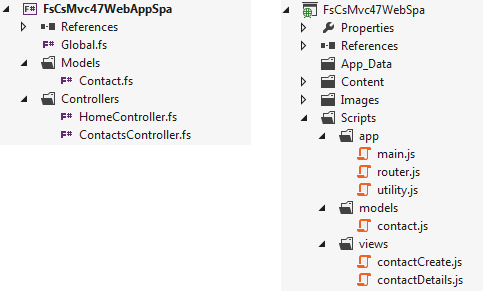
Highlights of the F# and C# project structure are shown below:


If you wish to learn more about the solution that is generated from this new template, see my previous post.