In December of last year, I announced a few templates that made it easy to create pure-F# MVC 5 and Web API 2 projects in Visual Studio 2012 and 2013. In a parallel stream, the F# team was working closely with the F# community to improve the F# web development experience by adding features such as publish-to-web. It's exciting to see that this great work is now available as a Visual F# Tools Preview. You can read more about this at http://blogs.msdn.com/b/fsharpteam/archive/2014/04/06/towards-web-project-support-in-the-visual-f-tools.aspx. This, as well as the recent announcement regarding the acceptance of contributions to the Visual F# Tools, is a huge step forward in the evolution of web development with F#.
Showing posts with label fsharp. Show all posts
Showing posts with label fsharp. Show all posts
Monday, April 21, 2014


Thursday, April 10, 2014
TypeScript in First-Class F# Web Projects
I was recently asked about how best to use TypeScript within a pure F# web project. Currently, there are two steps that are needed to make this happen.

1. Add the TypeScript item template by downloading and installing the latest version of the F# Web Item Templates extension from http://visualstudiogallery.msdn.microsoft.com/f1dae7fe-1ecc-4f1b-86b5-32a2970d012a.
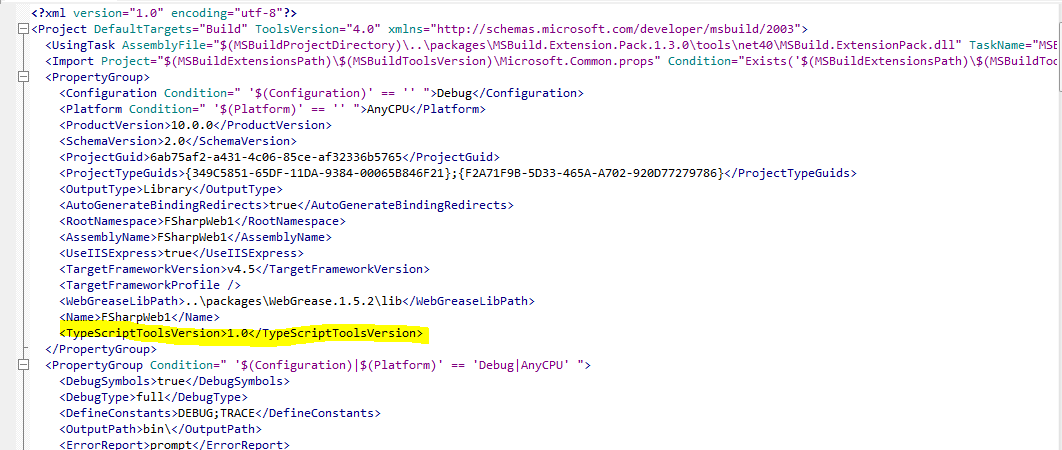
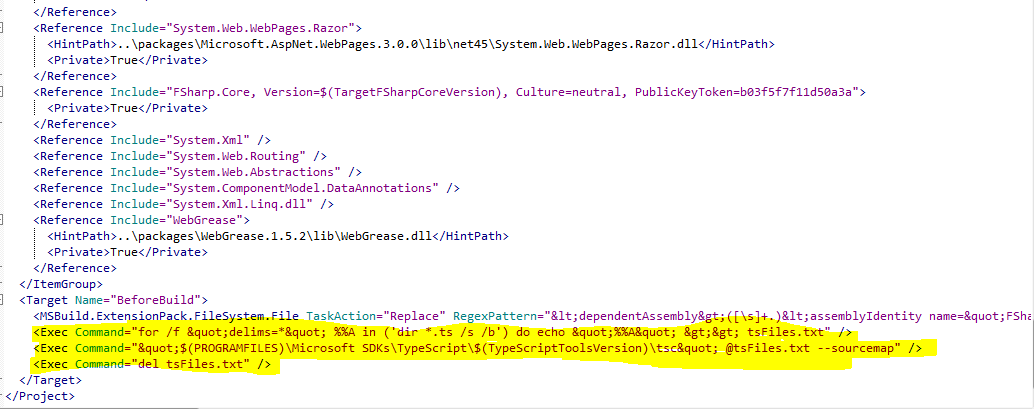
2. Modify your project file to allow the TypeScript files to compile to JavaScript when the project is compiled. To do this, you need to do the following:
- Edit your fsproj file.
- Add the TypeScriptToolsVersion element and specify the appropriate TypeScript version that you have installed.
- Add 3 new commands to the BeforeBuild target.
- Save and re-open your project. You should now be good to go.
I plan to work on a solution to reduce the pain of step 2 in the near future, so stay tuned...
Monday, December 2, 2013
New F# Web App Item Templates
There is a new VSIX available on Visual Studio Gallery that can help in the creation of first-class F# ASP.NET MVC and Web API projects. To see the new item templates, do the following:
1. Follow the steps defined in this post.
2. Install the VSIX from here or search for it and install from Tools | Extensions and Updates...
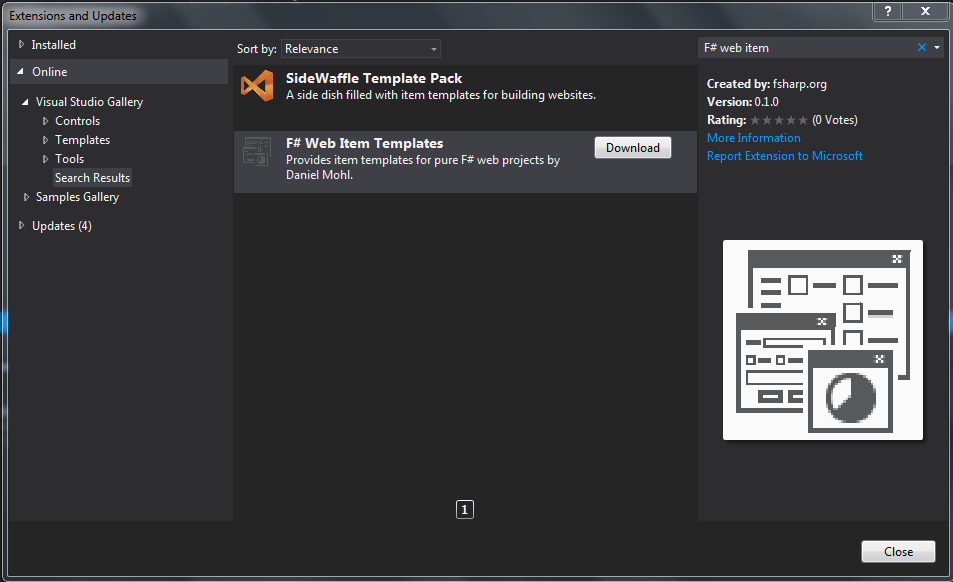
3. Restart Visual Studio and create or open a first-class F# ASP.NET MVC or Web API project. If you don't have one handy, you can get an MVC 5/Web API 2 template from here or install this sneak peak of one of the F# Nancy templates that Ryan Riley and I are working on.
4. Add a new item (Ctrl+Shift+A) and select the Web subcategory. You should see the following:

1. Follow the steps defined in this post.
2. Install the VSIX from here or search for it and install from Tools | Extensions and Updates...
3. Restart Visual Studio and create or open a first-class F# ASP.NET MVC or Web API project. If you don't have one handy, you can get an MVC 5/Web API 2 template from here or install this sneak peak of one of the F# Nancy templates that Ryan Riley and I are working on.
4. Add a new item (Ctrl+Shift+A) and select the Web subcategory. You should see the following:
Monday, November 11, 2013
A Few Changes to the F#/C# MVC 4 Project Template
There is a new version (v1.21) of the F#/C# MVC 4 project template. There are two new features worth noting in this release:
1. The AutoGenerateBindingRedirects attribute has been added to all of the project files. This attribute (that is newly available in .NET 4.5.1/VS2013) removes the need to constantly add or update binding redirects in your web.config or app.config files. This eliminates the errors that you often see when the binding redirect elements were missing in config files such as "System.MissingMethodException : Method not found...".
2. The project creation wizard now has an option to include FsUnit for NUnit or xUnit within the Test project. We plan to include MS Test as well as options without FsUnit in a future release.

1. The AutoGenerateBindingRedirects attribute has been added to all of the project files. This attribute (that is newly available in .NET 4.5.1/VS2013) removes the need to constantly add or update binding redirects in your web.config or app.config files. This eliminates the errors that you often see when the binding redirect elements were missing in config files such as "System.MissingMethodException : Method not found...".
2. The project creation wizard now has an option to include FsUnit for NUnit or xUnit within the Test project. We plan to include MS Test as well as options without FsUnit in a future release.

Wednesday, November 6, 2013
A New Home for the F# Community Project Templates

While at the Progressive F# Tutorials last week Don Syme and I worked together to create a new home for the community F# project templates. They can now be found under the F# Open Source Community GitHub org at https://github.com/fsharp/FSharpCommunityTemplates.
We would love to have you add to these templates. Simply follow the instructions in the readme file and submit a pull request.
Tuesday, November 5, 2013
F# Web Programming Session (slides and examples) at Progressive F# Tutorials 2013
Thanks to all who came out to the web programming session that Zach Bray and I led at Progressive F# Tutorials 2013. You can find the slides and examples from the session at https://github.com/dmohl/FsOnTheWeb-Workshop.
Additionally, you can find the FunScript and HashBang presentation at http://funscript.info/presentations/progf/slides.html#1 and a working example of the associated chat client/server app at https://github.com/ZachBray/HashBang.
Additionally, you can find the FunScript and HashBang presentation at http://funscript.info/presentations/progf/slides.html#1 and a working example of the associated chat client/server app at https://github.com/ZachBray/HashBang.
Monday, October 21, 2013
Progressive F# Tutorials 2013 in London
Progressive F# Tutorials 2013 in London is just over a week away and I am very excited!
On Friday (Nov. 1) Zach Bray and I will be hosting a session on web programming. Here are the details:
Visit http://skillsmatter.com/event/scala/progressive-f-tutorials-2013 for more info.
I hope to see you there!
On Friday (Nov. 1) Zach Bray and I will be hosting a session on web programming. Here are the details:
Web Programming F#--the open, cross-platform programming language--provides many features that lend themselves well to web development. These features combined with other modern web development tools such as HTML5, CSS3, JavaScript, and a plethora of web frameworks and libraries allow developers to build rich, web based solutions easier and faster than ever before. In this session, we'll go over a few ways to start taking advantage of F# in your web based solutions. You'll learn multiple approaches that involve the use of F# as the primary workhorse on the server as well as how to build full-stacks with F#. Along the way, we'll look at a few of the many features of F# that will improve your web development efforts. You owe it to yourself to learn the skills needed to build modern web applications with a modern programming language. |
Visit http://skillsmatter.com/event/scala/progressive-f-tutorials-2013 for more info.
I hope to see you there!
Sunday, July 7, 2013
New Angular.js Option in the F#/C# MVC 4 SPA Project Template
There's a new addition to the F#/C# MVC 4 SPA project template family. In addition to the previously supported options of Backbone.js and Knockout.js, you can now create a template with Angular.js as the JavaScript framework.
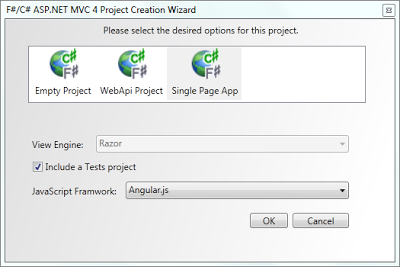
Angular.js is an MV* JavaScript framework that allows you to build web applications ina declarative style. Since F# also focuses on more of a declarative style, Angular.js + F# are a great combination.
The Angular related JS that comes out of this template is primarily isolated to the following files: scripts\app\router.js, scripts\controllers\contactDetailController.js, and scripts\controllers\contactCreateController.js. The JS for each of these is shown below:
router.js:
contactDetailController.js:
contactCreateController.js:
Enjoy!

Angular.js is an MV* JavaScript framework that allows you to build web applications in
The Angular related JS that comes out of this template is primarily isolated to the following files: scripts\app\router.js, scripts\controllers\contactDetailController.js, and scripts\controllers\contactCreateController.js. The JS for each of these is shown below:
router.js:
contactDetailController.js:
contactCreateController.js:
Enjoy!
Monday, July 9, 2012
A Few New NoSQL Helper Libraries
I've been working on a few new libraries lately that focus on providing functional wrappers around various NoSQL options.
FSharpCouch:
FSharpCouch is something that I wrote about a little over two years ago. At the time, it was more of an educational exercise, but I have since revised it and found aspects of it to be useful. This is now available on NuGet as package ID FSharpCouch.
Here's an example:
You can find additional examples and the full source at https://github.com/dmohl/FSharpCouch.
MongoFs:
MongoFs currently has a primary focus on function composition as it relates to setting up the MongoDB client aspects of server, database, and collection. It simply wraps functions around the necessary methods of the C# Mongo Driver and auto opens the encompassing module.
Here's an example:
You can get it from NuGet as package ID MongoFs and find more examples and source at https://github.com/dmohl/MongoFs.
FSharpCouch:
FSharpCouch is something that I wrote about a little over two years ago. At the time, it was more of an educational exercise, but I have since revised it and found aspects of it to be useful. This is now available on NuGet as package ID FSharpCouch.
Here's an example:
You can find additional examples and the full source at https://github.com/dmohl/FSharpCouch.
MongoFs:
MongoFs currently has a primary focus on function composition as it relates to setting up the MongoDB client aspects of server, database, and collection. It simply wraps functions around the necessary methods of the C# Mongo Driver and auto opens the encompassing module.
Here's an example:
You can get it from NuGet as package ID MongoFs and find more examples and source at https://github.com/dmohl/MongoFs.
Wednesday, May 23, 2012
Fog 0.1.3.0 Released
A new release of Fog is now available. The primary enhancement included in this release is support for Windows Azure Caching. Several bug fixes have also been included.
The caching functions are available in the Fog.Caching module. You can use them with code such as the following:
Fog is available via NuGet as ID Fog and the full source can be found on my GitHub.
The caching functions are available in the Fog.Caching module. You can use them with code such as the following:
[<DataContract>]
type TestRecord =
    { [<DataMember>] mutable Id : Guid
      [<DataMember>] mutable Name : string }

let testRecord = { Id = Guid.NewGuid(); Name = "Dan" }

let key = testRecord.Id.ToString()
Put key testRecord |> ignore

let result = Get<TestRecord> key
Fog is available via NuGet as ID Fog and the full source can be found on my GitHub.
Sunday, October 30, 2011
Calling F# Libraries from Metro Style Apps
This weekend, I finally got around to trying to build a polyglot Metro style app (C# front-end + F# back-end). This post will talk about the project file changes that were required and the one outstanding issue that I'm still working. Additionally, a VSIX package is provided that provides the F# Metro Library project template as it exists today.
Note: This approach has only been tested with the simplest of examples.
Getting Setup:
1. In order to create a Metro style app, you need to install Windows 8 Developer Preview with Developer Tools.
2. To also have F#, you'll then need to install Visual Studio 11 Developer Preview.
3. Now create a new C# Windows Metro style application (I chose the Application template).
Adding F#:
If you have installed the VSIX that is linked at the bottom of this post, you can simply add the F# Metro Library, write some code, wire it up, and test. If not, you'll need to add a standard F# Library project and modify the project file.
Modifying the F# Project File:
To allow a F# Library project to be called from a Metro app., the project file must be modified so that it imports the Microsoft.Windows.UI.Xaml.Common.targets. While this small adjustment allows the project to be interacted with, the reference shown in the Metro style project will provide a warning indicating that something isn't quite copacetic. This warning can be eliminated by adding the following elements to the property group:
<TargetFrameworkIdentifier>.NETCore</TargetFrameworkIdentifier><TargetFrameworkVersion>v4.5</TargetFrameworkVersion>
Unfortunately, adding these elements causes some sort of conflict with the F# targets, which I am still working to resolve.I have not yet run into an issue (other than the unsightly warning display) that is caused by leaving out these two elements, so for the moment only the common Xaml targets import has been added.
Conclusion:
While there is still a lot of work to do, adding the import of the common Xaml targets to the F# project file will allow you to start using F# projects from Metro style apps (Note: In simple cases only--for now). Once the remaining issues are identified and resolved, I'll add the F# Metro Library VSIX to Visual Studio Gallery. Until then, you can find the F# Metro Library VSIX (with the known issues) here.
Note: This approach has only been tested with the simplest of examples.
Getting Setup:
1. In order to create a Metro style app, you need to install Windows 8 Developer Preview with Developer Tools.
2. To also have F#, you'll then need to install Visual Studio 11 Developer Preview.
3. Now create a new C# Windows Metro style application (I chose the Application template).
Adding F#:
If you have installed the VSIX that is linked at the bottom of this post, you can simply add the F# Metro Library, write some code, wire it up, and test. If not, you'll need to add a standard F# Library project and modify the project file.
Modifying the F# Project File:
To allow a F# Library project to be called from a Metro app., the project file must be modified so that it imports the Microsoft.Windows.UI.Xaml.Common.targets. While this small adjustment allows the project to be interacted with, the reference shown in the Metro style project will provide a warning indicating that something isn't quite copacetic. This warning can be eliminated by adding the following elements to the property group:
<TargetFrameworkIdentifier>.NETCore</TargetFrameworkIdentifier><TargetFrameworkVersion>v4.5</TargetFrameworkVersion>
Unfortunately, adding these elements causes some sort of conflict with the F# targets, which I am still working to resolve.
Conclusion:
While there is still a lot of work to do, adding the import of the common Xaml targets to the F# project file will allow you to start using F# projects from Metro style apps (Note: In simple cases only--for now). Once the remaining issues are identified and resolved, I'll add the F# Metro Library VSIX to Visual Studio Gallery. Until then, you can find the F# Metro Library VSIX (with the known issues) here.
Monday, October 3, 2011
MSDN Magazine Article: Authoring an F#/C# VSIX Project Template
My MSDN Magazine article entitled Authoring an F#/C# VSIX Project Template is now available in the October 2011 issue of MSDN Magazine.
A big thanks to Elijah Manor, Rick Minerich, and Chris Marinos for reviewing the article!
You can find the online version at http://msdn.microsoft.com/en-us/magazine/hh456399.aspx, the full code samples at http://fsharpmvc3vsix.codeplex.com/, and an enhanced version of the associated VSIX on Visual Studio Gallery at F#/C# ASP.NET MVC 3 Empty Web Application Template (see this previous post for more information about the extension that is available on Visual Studio Gallery).

A big thanks to Elijah Manor, Rick Minerich, and Chris Marinos for reviewing the article!
You can find the online version at http://msdn.microsoft.com/en-us/magazine/hh456399.aspx, the full code samples at http://fsharpmvc3vsix.codeplex.com/, and an enhanced version of the associated VSIX on Visual Studio Gallery at F#/C# ASP.NET MVC 3 Empty Web Application Template (see this previous post for more information about the extension that is available on Visual Studio Gallery).
Saturday, October 1, 2011
New F#/C# ASP.NET MVC 3 Template
There is a new F#/C# ASP.NET MVC 3 template now available on Visual Studio Gallery.

This template requires the ASP.NET MVC 3 Tools Refresh to be installed on the target machine and it provides functionality slightly similar to that which the Tools Refresh adds for C#/VB. Information on installing the ASP.NET MVC 3 Tools Refresh can be found at http://www.asp.net/mvc/mvc3.
With this project template, you will be able to create an empty ASP.NET MVC 3 Web Application. During the creation process, you will see a screen similar to the following with options that allow selection of ASPX or Razor view engine. Additionally, you can optionally choose to include a project which can be used to contain unit tests.

As usual, you can find the full source on my GitHub. Note: This template is an enhanced version of a template that is described in the MSDN Magazine article entitled "Authoring an F#/C# VSIX Project Template". I will be posting something about this article very soon.

This template requires the ASP.NET MVC 3 Tools Refresh to be installed on the target machine and it provides functionality slightly similar to that which the Tools Refresh adds for C#/VB. Information on installing the ASP.NET MVC 3 Tools Refresh can be found at http://www.asp.net/mvc/mvc3.
With this project template, you will be able to create an empty ASP.NET MVC 3 Web Application. During the creation process, you will see a screen similar to the following with options that allow selection of ASPX or Razor view engine. Additionally, you can optionally choose to include a project which can be used to contain unit tests.

As usual, you can find the full source on my GitHub. Note: This template is an enhanced version of a template that is described in the MSDN Magazine article entitled "Authoring an F#/C# VSIX Project Template". I will be posting something about this article very soon.
Sunday, July 17, 2011
WPF Behaviors in the F# WPF Project Templates
In my last post, I mentioned that I was working on a few enhancements to the my F# WPF Project Templates that are out on Visual Studio Gallery. I'm happy to say that the new versions of the F# and C# Windows App (WPF, MVVM) and F# Windows App (WPF, MVVM) templates are now available.
What Was Changed?
For the F# Windows App (WPF, MVVM) template, a few WPF behaviors have been added. I'll talk about these changes in a bit (for those that can't wait, see http://fssnip.net/62 and http://fssnip.net/6h).
The F# and C# Windows App (WPF, MVVM) template includes all of the same changes as the F# only template. Additionally, I've taken the multiple F# projects that were previously provided in this template and coalesced them into one F# project. I believe that this change better reflects the real-world use of this template.
You Mentioned WPF Behaviors?
The biggest change to the templates is the addition of examples of a few different types of WPF behaviors. These templates include examples of event to command as well as a type converter. The event to command implementation is Blendable (meaning that it plays well with Expression Blend) and is loosely based on the MVVM Light Toolkit EventToCommand implementation.
Here's the code:
Here's the XAML that uses this code:
The value converter example uses a ConverterBase class that simplifies the creation of any concrete implementations. This base class uses a combination of functional and object-oriented programming to provide a default implementation of Convert and ConvertBack. The child class can then provide a function to override the implementation of either or both of these methods. For the sake of brevity, I will not post the ConvertBase code here, but you can go to http://fssnip.net/62 to see it.
The concrete implementation that is provided as an example in these project templates is shown below:
This can be used in XAML like this:
While I don't have an example in these templates of an Attached Property written in F#, it is worth noting that you can find just such an example at http://fssnip.net/69.
What Was Changed?
For the F# Windows App (WPF, MVVM) template, a few WPF behaviors have been added. I'll talk about these changes in a bit (for those that can't wait, see http://fssnip.net/62 and http://fssnip.net/6h).
The F# and C# Windows App (WPF, MVVM) template includes all of the same changes as the F# only template. Additionally, I've taken the multiple F# projects that were previously provided in this template and coalesced them into one F# project. I believe that this change better reflects the real-world use of this template.
You Mentioned WPF Behaviors?
The biggest change to the templates is the addition of examples of a few different types of WPF behaviors. These templates include examples of event to command as well as a type converter. The event to command implementation is Blendable (meaning that it plays well with Expression Blend) and is loosely based on the MVVM Light Toolkit EventToCommand implementation.
Here's the code:
namespace FSharpWpfMvvmTemplate.Behavior

open System
open System.Windows
open System.Windows.Input
open System.Windows.Interactivity

type EventToCommand() =
    inherit TriggerAction<DependencyObject>()
    [<DefaultValue(false)>]
    static val mutable private CommandProperty:DependencyProperty
    [<DefaultValue(false)>]
    static val mutable private CommandParameterProperty:DependencyProperty

    /// Set the command dependency property
    static do
        EventToCommand.CommandProperty <-
            DependencyProperty.Register("Command",
                typeof<ICommand>, typeof<EventToCommand>)

    /// Set the command parameter dependency property
    static do
        EventToCommand.CommandParameterProperty <-
            DependencyProperty.Register("CommandParameter",
                typeof<obj>, typeof<EventToCommand>)

    /// Get/Set the Command
    member this.Command
        with get() = this.GetValue EventToCommand.CommandProperty :?> ICommand
        and set value = this.SetValue(EventToCommand.CommandProperty, value)

    /// Get/Set the CommandParameter
    member this.CommandParameter
        with get() = this.GetValue EventToCommand.CommandParameterProperty
        and set value = this.SetValue(EventToCommand.CommandParameterProperty, value)

    /// Implement the Invoke method from TriggerAction to execute the command
    override this.Invoke parameter =
        let command = this.Command
        let commandParameter = match this.CommandParameter with
                               | null -> parameter
                               | commandParam -> commandParam
        if command <> null && command.CanExecute(commandParameter) then
            command.Execute(commandParameter)
Here's the XAML that uses this code:
        <Button Grid.Row="2" Command="{Binding ApproveExpenseReportCommand}"
                Style="{StaticResource buttonStyle}" Content="Approve"
                Grid.Column="1" Margin="0,10,53,0">
            <i:Interaction.Triggers>
                <i:EventTrigger EventName="MouseEnter">
                    <Behavior:EventToCommand
                            Command="{Binding MouseEnterButtonCommand}"
                            CommandParameter="Approve" />
                </i:EventTrigger>
                <i:EventTrigger EventName="MouseLeave">
                    <Behavior:EventToCommand
                            Command="{Binding MouseLeaveButtonCommand}" />
                </i:EventTrigger>
            </i:Interaction.Triggers>
        </Button>
The value converter example uses a ConverterBase class that simplifies the creation of any concrete implementations. This base class uses a combination of functional and object-oriented programming to provide a default implementation of Convert and ConvertBack. The child class can then provide a function to override the implementation of either or both of these methods. For the sake of brevity, I will not post the ConvertBase code here, but you can go to http://fssnip.net/62 to see it.
The concrete implementation that is provided as an example in these project templates is shown below:
namespace FSharpWpfMvvmTemplate.Behavior

open System
open System.Windows
open System.Windows.Data
open System.Windows.Media
open ConverterBase

/// Returns Visibility.Visible if the string is not null or empty
type StringExistsToVisibilityConverter() =
    inherit ConverterBase()
    let convertFunc = fun (v:obj) _ _ _ ->
        match String.IsNullOrEmpty(string v) with
        | false -> Visibility.Visible
        | _ -> Visibility.Collapsed
        :> obj
    override this.Convert = convertFunc
This can be used in XAML like this:
<TextBlock Grid.Row="3" HorizontalAlignment="Center" Margin="0,10,0,0"
                FontSize="12" FontWeight="Bold"
                Grid.ColumnSpan="2" Text="{Binding LastApprovalDisplayMessage}"
                Visibility="{Binding Path=LastApprovalDisplayMessage,
                            Converter={StaticResource StringExistsToVisibility}}" />
While I don't have an example in these templates of an Attached Property written in F#, it is worth noting that you can find just such an example at http://fssnip.net/69.
Tuesday, July 5, 2011
A Few Items of Note
In this post, I'm going to highlight a few things that I have been working on that aren't big enough to warrant their own blog entry, but that are worth pointing out. Note: If you follow me on Twitter (i.e. @dmohl) you may have already heard about these things.
1. In Feb. of this year, I blogged about the F# PowerPack being added to NuGet gallery. Since that time, there have been several requests to add the .NET 4 binaries to that NuGet package. I'm happy to say that a new version of the FSPowerPack.Community package has been uploaded that includes these binaries.
2. In Jan. of this year, an F# ASP.NET MVC 3 template was announced. There have been a few reports of an exception on some operating systems during the extension installation that points to a specific path that is too long. For those of you who are experiencing this error, there is a VSIX with a reduced path length available for download at https://sites.google.com/site/danodocs/Home/FSMVC3_min.vsix.
3. Have you visited the F# Snippets site yet? If not, I strongly recommend checking it out. While you are there, have a look at the WPF/Silverlight Value Converter base class and sample concrete implementation as well as an example of a WPF/Silverlight Attached Property. I'd love to hear what you think. Along these lines, I've been working on a few additions to the F# WPF templates that have been announced on this blog. If you have any enhancement requests, send them my way.
1. In Feb. of this year, I blogged about the F# PowerPack being added to NuGet gallery. Since that time, there have been several requests to add the .NET 4 binaries to that NuGet package. I'm happy to say that a new version of the FSPowerPack.Community package has been uploaded that includes these binaries.
2. In Jan. of this year, an F# ASP.NET MVC 3 template was announced. There have been a few reports of an exception on some operating systems during the extension installation that points to a specific path that is too long. For those of you who are experiencing this error, there is a VSIX with a reduced path length available for download at https://sites.google.com/site/danodocs/Home/FSMVC3_min.vsix.
3. Have you visited the F# Snippets site yet? If not, I strongly recommend checking it out. While you are there, have a look at the WPF/Silverlight Value Converter base class and sample concrete implementation as well as an example of a WPF/Silverlight Attached Property. I'd love to hear what you think. Along these lines, I've been working on a few additions to the F# WPF templates that have been announced on this blog. If you have any enhancement requests, send them my way.
Thursday, June 30, 2011
F# XAML Item Templates Now on Visual Studio Gallery
A new VS2010 extension is now available on Visual Studio Gallery that provides several XAML related item templates for F# projects. The provided item templates include Window for WPF as well as Page, UserControl, and ResourceDictionary for Silverlight and WPF.
To get started, do the following:
1. Download and install the extension from http://visualstudiogallery.msdn.microsoft.com/06c6ece1-2084-4083-a0f7-934fce9d22fb or through the Extention Manager in Visual Studio 2010 as shown below (Extension Manager can be found under Tools -> Extension Manager..):

2. Once installed, you will see the following option available in the Add New Item wizard for F# Silverlight projects:

3. For F# WPF projects, the Add New Item wizard will look like the following:
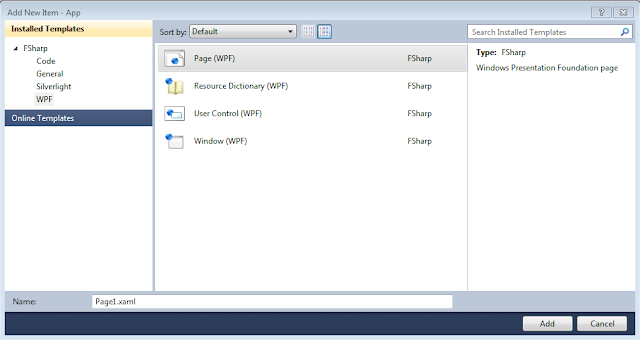
These item templates complement the existing F# WPF and Silverlight project templates quite well. Here is a list of a few of these project templates that are currently available on Visual Studio Gallery:
F# Web Application (Silverlight)
WPF:
F# App Template with Theme
F# Windows App (WPF, MVVM)
F# WPF Application
As usual you can find the source on my github (https://github.com/dmohl/FsXAMLItemTemplate).
To get started, do the following:
1. Download and install the extension from http://visualstudiogallery.msdn.microsoft.com/06c6ece1-2084-4083-a0f7-934fce9d22fb or through the Extention Manager in Visual Studio 2010 as shown below (Extension Manager can be found under Tools -> Extension Manager..):

2. Once installed, you will see the following option available in the Add New Item wizard for F# Silverlight projects:

3. For F# WPF projects, the Add New Item wizard will look like the following:

These item templates complement the existing F# WPF and Silverlight project templates quite well. Here is a list of a few of these project templates that are currently available on Visual Studio Gallery:
Silverlight:
WPF:
F# App Template with Theme
F# Windows App (WPF, MVVM)
F# WPF Application
As usual you can find the source on my github (https://github.com/dmohl/FsXAMLItemTemplate).
Saturday, June 25, 2011
Version 1.3.0.1 of the F# and C# Win Phone App (Silverlight) Project Template Released
Version 1.3.0.1 of the basic WP7 project template has been released. The core feature of this release is a new item template that allows you to add a F# Source File in WP7 projects. Prior to this release, attempting to add a new item through the standard process resulted only in options targeting C#.
To take advantage of this new feature, do the following:
1. Install the 1.3.0.1 version of the project template (see this blog post for more information).
2. Right click on the F# project and select Add -> New Item...
3. The resulting window will now include a F# Source File item as shown below:

To take advantage of this new feature, do the following:
1. Install the 1.3.0.1 version of the project template (see this blog post for more information).
2. Right click on the F# project and select Add -> New Item...
3. The resulting window will now include a F# Source File item as shown below:

Thursday, June 2, 2011
FsUnit.MvcSample Now On NuGet Gallery
A new NuGet package is now available on the NuGet Gallery that makes it very easy to get started using FsUnit to test your ASP.NET MVC apps. The packageId is FsUnit.MvcSample and it can be found at http://nuget.org/List/Packages/FsUnit.MvcSample. For more information on FsUnit and the previously provided FsUnit NuGet package, check out http://bloggemdano.blogspot.com/2011/02/fsunit-now-on-nuget-gallery.html.
As usual, you can find everything used to create this package on my github (https://github.com/dmohl/FsUnit.MvcSample.NuGet).
As usual, you can find everything used to create this package on my github (https://github.com/dmohl/FsUnit.MvcSample.NuGet).
Tuesday, May 24, 2011
Getting Started with FSRepository 2.0
FSRepository 2.0 is now available in the NuGet gallery. This version references EF 4.1, fixes an issue, and attempts to provide a more intuitive example.
Getting Started:
It's easy to get started with FSRepository 2.0.
1. Create a new F# Application (this example uses a project named TestFSRepository).
2. Follow the instructions defined in http://bloggemdano.blogspot.com/2011/01/fsrepository-new-nuget-package.html to install the FSRepository package.
3. Move the FSRepository.fs file above the Program.fs file (see http://lorgonblog.wordpress.com/2008/08/03/sneak-peeks-into-the-f-project-system-part-three/ for information on how to do this).
4. Add the following code to Program.fs and you're done.
Getting Started:
It's easy to get started with FSRepository 2.0.
1. Create a new F# Application (this example uses a project named TestFSRepository).
2. Follow the instructions defined in http://bloggemdano.blogspot.com/2011/01/fsrepository-new-nuget-package.html to install the FSRepository package.
3. Move the FSRepository.fs file above the Program.fs file (see http://lorgonblog.wordpress.com/2008/08/03/sneak-peeks-into-the-f-project-system-part-three/ for information on how to do this).
4. Add the following code to Program.fs and you're done.
open TestFSRepository.Repositories

type Program() =
    static member Run() =
        use sampleRepository = new SampleRepository()
        let sample = new ASample()
        sample.Id <- 1
        sample.CreatedBy <- "Dan"
        do sampleRepository.Add sample
        do sampleRepository.Save()
        sampleRepository.GetAll()
        |> Seq.iter (fun (sample:ASample) ->
                   (printfn "Sample Id = %A" sample.Id |> ignore))

Program.Run()
Subscribe to:
Posts (Atom)