In December of last year, I announced a few templates that made it easy to create pure-F# MVC 5 and Web API 2 projects in Visual Studio 2012 and 2013. In a parallel stream, the F# team was working closely with the F# community to improve the F# web development experience by adding features such as publish-to-web. It's exciting to see that this great work is now available as a Visual F# Tools Preview. You can read more about this at http://blogs.msdn.com/b/fsharpteam/archive/2014/04/06/towards-web-project-support-in-the-visual-f-tools.aspx. This, as well as the recent announcement regarding the acceptance of contributions to the Visual F# Tools, is a huge step forward in the evolution of web development with F#.
Showing posts with label ASP.NET Web API. Show all posts
Showing posts with label ASP.NET Web API. Show all posts
Monday, April 21, 2014


Saturday, November 30, 2013
Adding New Items to a Pure F# ASP.NET MVC/Web API Project
UPDATE 12/15/2013:
-----------------------
The F# community has been working hard on ways to make this process easier. To that end, here are the new and improved instructions:
Option 1: Visual Studio Project Template Option:
The easiest option is to simply install the latest version of either the F# MVC 5 template or the F# Nancy template. These templates now include a custom NuGet package that contains an Install.ps1 file that will automatically add the needed registry entries.
Option 2: PowerShell Option:
If you prefer to run the PowerShell file manually, you can do the following:
1. Launch PowerShell (you may need to run PowerShell as administrator).
2. Download the AddRegistryEntries.ps1 file and execute it with the command ./AddRegstryEntries.ps1
Option 3: Batch File Option:
If you don't want to use PowerShell, there is also a batch file option.
1. Download the AddRegistryEntries.bat file.
2. Run the batch file as administrator.
You should now be able to see the items shown in step #5 of the original post. Don't forget to checkout the F# Web Item Templates as well.
-----------------------
A few months ago Mark Seemann put together a great post on how to create a pure F# ASP.NET Web API project. One of the biggest disadvantages mentioned in that post is that once the necessary changes are made to the ProjectTypeGuids element in the fsproj file, the Add New Item wizard no longer displays items. After much trial and error, I've found a fix for this issue.
Note: While the change mentioned here is pretty mild, the standard registry edit disclaimer still applies. It's recommended that you backup your registry before making changes as incorrect changes/additions/deletions can have serious and unexpected consequences.
Here are the steps for VS2013 (for VS2012 the steps should be similar, but with a slightly different registry path).
1. Edit the registry (e.g. run regedit.exe).
2. Locate HKEY_LOCAL_MACHINE or HKEY_LOCAL_USER then \SOFTWARE\Microsoft\VisualStudio\ then 12.0 or 12.0_Config then \Projects\
3. Find {349C5851-65DF-11DA-9384-00065B846F21}. If there is more than one, find the one with LanguageTemplates as the child.
4. Add a new String Value entry to the LanguageTemplates node with a key and value of {F2A71F9B-5D33-465A-A702-920D77279786}.

5. Test it out by closing all instances of VS, creating a pure F# ASP.NET MVC or Web API project, and trying to add a new item. You should now see all of the usual F# item templates.
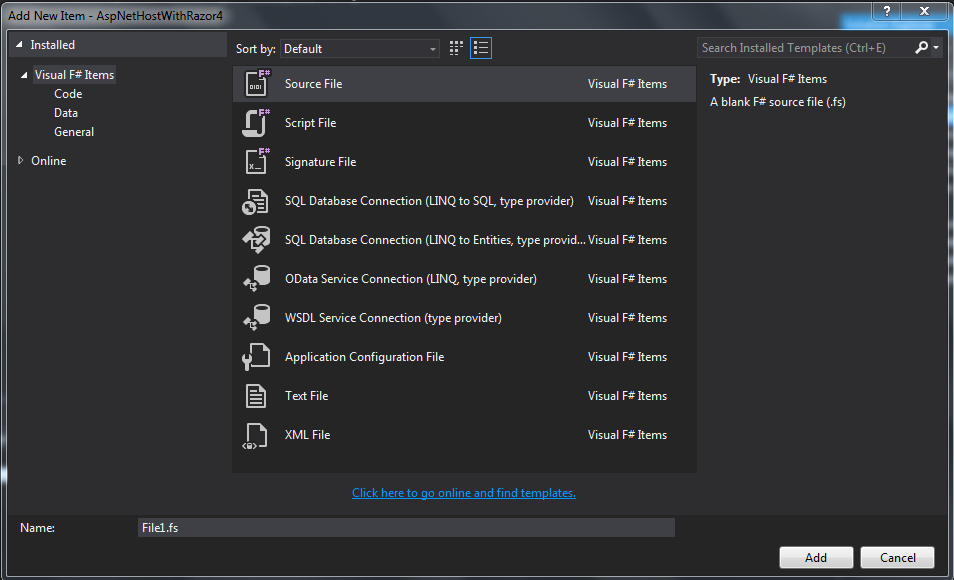
If you want to try this out without having to manually create a pure F# ASP.NET MVC or Web API project, here's a sneak peak of one of the F# Nancy templates that Ryan Riley and I are working on. Look for the full collection of F# Nancy templates in the next few weeks. You can get involved with the Nancy templates by contributing to https://github.com/fsharp/FSharpCommunityTemplates/tree/master/VisualStudio/Nancy.Templates.
-----------------------
The F# community has been working hard on ways to make this process easier. To that end, here are the new and improved instructions:
Option 1: Visual Studio Project Template Option:
The easiest option is to simply install the latest version of either the F# MVC 5 template or the F# Nancy template. These templates now include a custom NuGet package that contains an Install.ps1 file that will automatically add the needed registry entries.
Option 2: PowerShell Option:
If you prefer to run the PowerShell file manually, you can do the following:
1. Launch PowerShell (you may need to run PowerShell as administrator).
2. Download the AddRegistryEntries.ps1 file and execute it with the command ./AddRegstryEntries.ps1
Option 3: Batch File Option:
If you don't want to use PowerShell, there is also a batch file option.
1. Download the AddRegistryEntries.bat file.
2. Run the batch file as administrator.
You should now be able to see the items shown in step #5 of the original post. Don't forget to checkout the F# Web Item Templates as well.
-----------------------
A few months ago Mark Seemann put together a great post on how to create a pure F# ASP.NET Web API project. One of the biggest disadvantages mentioned in that post is that once the necessary changes are made to the ProjectTypeGuids element in the fsproj file, the Add New Item wizard no longer displays items. After much trial and error, I've found a fix for this issue.
Note: While the change mentioned here is pretty mild, the standard registry edit disclaimer still applies. It's recommended that you backup your registry before making changes as incorrect changes/additions/deletions can have serious and unexpected consequences.
Here are the steps for VS2013 (for VS2012 the steps should be similar, but with a slightly different registry path).
1. Edit the registry (e.g. run regedit.exe).
2. Locate HKEY_LOCAL_MACHINE or HKEY_LOCAL_USER then \SOFTWARE\Microsoft\VisualStudio\ then 12.0 or 12.0_Config then \Projects\
3. Find {349C5851-65DF-11DA-9384-00065B846F21}. If there is more than one, find the one with LanguageTemplates as the child.
4. Add a new String Value entry to the LanguageTemplates node with a key and value of {F2A71F9B-5D33-465A-A702-920D77279786}.
5. Test it out by closing all instances of VS, creating a pure F# ASP.NET MVC or Web API project, and trying to add a new item. You should now see all of the usual F# item templates.
If you want to try this out without having to manually create a pure F# ASP.NET MVC or Web API project, here's a sneak peak of one of the F# Nancy templates that Ryan Riley and I are working on. Look for the full collection of F# Nancy templates in the next few weeks. You can get involved with the Nancy templates by contributing to https://github.com/fsharp/FSharpCommunityTemplates/tree/master/VisualStudio/Nancy.Templates.
Monday, December 31, 2012
My Top 5 Blog Posts from 2012
On this last day of 2012, I'd like to look back and share my top 5 most popular blog posts from this year.
5. On January 8, I introduced a CoffeeScript Assertion Library called ExpectThat. ExpectThat makes it easy to create expressive, self-documenting assertions in CoffeeScript with a syntax similar to that provided by FsUnit.
4. In September, an example of a Single Page Application with Backbone.js, ASP.NET Web API, and F# was provided. This was then added to the F# and C# ASP.NET MVC 4 project template.
3. At the end of January, an example was given for how to use ExpectThat with Mocha to test a jQuery plugin. This example builds on a nice post by Josh Bush entitled Testing jQuery plugins with Node.js and Jasmine and it includes examples for both browser and Node tests with Mocha and ExpectThat.
2. In March, I announced an addition to the F# and C# ASP.NET MVC 4 template that makes it easy to create modern HTTP services with ASP.NET Web API and F#.
1. And my most popular post from 2012 was an example of a Single Page Application with Knockout.js, ASP.NET Web API, and F# . This was later added as an option to the F# and C# ASP.NET MVC 4 project template.
Happy New Year!
5. On January 8, I introduced a CoffeeScript Assertion Library called ExpectThat. ExpectThat makes it easy to create expressive, self-documenting assertions in CoffeeScript with a syntax similar to that provided by FsUnit.
4. In September, an example of a Single Page Application with Backbone.js, ASP.NET Web API, and F# was provided. This was then added to the F# and C# ASP.NET MVC 4 project template.
3. At the end of January, an example was given for how to use ExpectThat with Mocha to test a jQuery plugin. This example builds on a nice post by Josh Bush entitled Testing jQuery plugins with Node.js and Jasmine and it includes examples for both browser and Node tests with Mocha and ExpectThat.
2. In March, I announced an addition to the F# and C# ASP.NET MVC 4 template that makes it easy to create modern HTTP services with ASP.NET Web API and F#.
1. And my most popular post from 2012 was an example of a Single Page Application with Knockout.js, ASP.NET Web API, and F# . This was later added as an option to the F# and C# ASP.NET MVC 4 project template.
Happy New Year!
Sunday, December 23, 2012
Buiilding Web, Cloud, and Mobile Solutions with F#

I'm happy to say that my book entitled Building Web, Cloud, and Mobile Solutions with F# is now available in both print and electronic formats. The description of the book is provided below and you can find the book examples on my GitHub.
Learn how to build key aspects of web, cloud, and mobile solutions by combining F# with various .NET and open source technologies. With helpful examples, this hands-on book shows you how to tackle concurrency, asynchrony, and other server-side challenges. You’ll quickly learn how to be productive with F#, whether you want to integrate the language into your existing web application or use it to create the next Twitter.If you’re a mid- to senior-level .NET programmer, you’ll discover how this expressive functional-first language helps you write robust, maintainable, and reusable solutions that scale easily and target multiple devices.
- Use F# with ASP.NET MVC, ASP.NET Web API, WCF, Windows Azure, HTML5, CSS3, jQuery Mobile, and other tools
- Build next-generation ASP.NET MVC 4 web applications, using F# to do the heavy lifting on the server
- Create WCF SOAP and HTTP web services
- Develop F# web applications and services that run on Windows Azure
- Build scalable solutions that allow reuse by mobile and web front-ends
- Use F# with the WebSharper and Pit frameworks to build end-to-end web stacks
Monday, October 29, 2012
Using F# Records with ASP.NET Web API
In the Knockout.js and Backbone.js examples that I provided over the last few weeks, the model was written as a class using the traditional syntax. Here's an example:
While this approach works well, it would be great if we could use F# records instead. It turns out that with a few tweaks, this is easy to accomplish. Let's see how to do this in the Knockout.js example.
First, we'll change the model to be an F# record. The new model looks like this:
We'll also need to change how the example data is initialized. This code now looks like this:
Lastly, a small change is needed in the ContactsViewModel. This now looks like the following:
While this approach works well, it would be great if we could use F# records instead. It turns out that with a few tweaks, this is easy to accomplish. Let's see how to do this in the Knockout.js example.
First, we'll change the model to be an F# record. The new model looks like this:
We'll also need to change how the example data is initialized. This code now looks like this:
Lastly, a small change is needed in the ContactsViewModel. This now looks like the following:
Monday, October 15, 2012
Knockout.js Added to the F#/C# MVC 4 Single Page Application Template
Two weeks I announced a new Single Page Application (SPA) template with Backbone.js in the F# C# MVC 4 Visual Studio extension. Last week an example of a SPA with Knockout.js was provided. I bet you can guess what's coming...
Today, you can get version 1.13 of the F# C# MVC 4 extension, which gives you the option to choose between Backbone.js and Knockout.js when creating a F#/C# SPA.
The new project creation screen looks like this:

If you would like to see additional JavaScript frameworks included as options, let me know.
You can find information on the Knockout.js version in this post and information on the Backbone.js version in this post. Note: A C# only version and a PHP version of the Backbone.js example is available at https://github.com/dmohl/FsWebSpa-Backbone/downloads.
Today, you can get version 1.13 of the F# C# MVC 4 extension, which gives you the option to choose between Backbone.js and Knockout.js when creating a F#/C# SPA.
The new project creation screen looks like this:

If you would like to see additional JavaScript frameworks included as options, let me know.
You can find information on the Knockout.js version in this post and information on the Backbone.js version in this post. Note: A C# only version and a PHP version of the Backbone.js example is available at https://github.com/dmohl/FsWebSpa-Backbone/downloads.
Monday, October 8, 2012
A Single Page App with Knockout.js, ASP.NET Web API, and F#
A few weeks ago, I posted a simple example of a Single Page Application (SPA) built with Backbone.js, ASP.NET Web API, F#, C#, and more. Today, I'm posting a similar example, but built with Knockout.js. Let's look at some of the code.
View:
Knockout.js supports binding of model data directly to DOM elements, so the first thing that we will look at is one of the templates that are used for the views. Here's what this example uses for the contacts list view template:
The main thing to notice in this markup is the use of the data-bind attributes to bind specific model data to the appropriate DOM elements.
ViewModel:
The example defines a single ViewModel that is used for both of the available views. The code, which is fairly similar to that described at http://knockoutjs.com/examples/contactsEditor.html, is shown below:
Router:
Another thing to notice is the routing mechanism used in this example. Since Knockout.js doesn't provide built in URL routing, I've used Sammy.js to accommodate the need. Here's what the router looks like:
ApiController:
Lastly, we'll get a quick look at the API Controller that is written in F#. Here's the code:
That's pretty much it. You can find the full solution at https://github.com/dmohl/FsWebSpa-Knockout.
View:
Knockout.js supports binding of model data directly to DOM elements, so the first thing that we will look at is one of the templates that are used for the views. Here's what this example uses for the contacts list view template:
The main thing to notice in this markup is the use of the data-bind attributes to bind specific model data to the appropriate DOM elements.
ViewModel:
The example defines a single ViewModel that is used for both of the available views. The code, which is fairly similar to that described at http://knockoutjs.com/examples/contactsEditor.html, is shown below:
Router:
Another thing to notice is the routing mechanism used in this example. Since Knockout.js doesn't provide built in URL routing, I've used Sammy.js to accommodate the need. Here's what the router looks like:
ApiController:
Lastly, we'll get a quick look at the API Controller that is written in F#. Here's the code:
That's pretty much it. You can find the full solution at https://github.com/dmohl/FsWebSpa-Knockout.
Thursday, September 27, 2012
A Single Page App with Backbone.js, ASP.NET Web API, and F#
In this post, I introduce a simple example of a single page application built with Backbone.js, ASP.NET Web API, F#, and more. The example is an overly simple contacts app that allows you to view contacts and create new ones. It uses the Foundation 3 framework for styling and responsive design.
Here's a screenshot of the simple contact list view:

Solution Organization:
The C# project contains the following:
The heart of the client-side code is broken into 3 folders within the Scripts folder of the C# project:
The F# project contains the following:
Getting the Code:
You can find the full source at https://github.com/dmohl/FsWebSpa-Backbone.
EDIT: You can find a C# version at https://github.com/downloads/dmohl/FsWebSpa-Backbone/SpaBackbone-CSharp.zip.
Here's a screenshot of the simple contact list view:

Solution Organization:
The C# project contains the following:
- A single Index.cshtml file.
- All images, CSS, and JavaScript.
- A "Templates" folder that contains 2 .htm files that hold the markup for each view. The templating feature of underscore.js is used to allow placeholders in the templates to be replaced with the desired data.
The heart of the client-side code is broken into 3 folders within the Scripts folder of the C# project:
- The "app" folder contains a main.js, a utility.js, and a file containing route definitions using Backbone.Router.
- The "models" folder contains the Backbone models and collections.
- The "views" folder contains Backbone views.
The F# project contains the following:
- ASP.NET MVC and Web API routes.
- Definitions of JS and CSS bundles.
- ASP.NET MVC and Web API Controllers.
- A Model class.
Getting the Code:
You can find the full source at https://github.com/dmohl/FsWebSpa-Backbone.
EDIT: You can find a C# version at https://github.com/downloads/dmohl/FsWebSpa-Backbone/SpaBackbone-CSharp.zip.
Monday, June 4, 2012
F#/C# ASP.NET MVC 4 Template for Visual Studio 2012 RC
The F#/C# ASP.NET MVC 4 template has been updated to support ASP.NET MVC 4 RC and Visual Studio 2012 RC. You will need to install the release candidate of ASP.NET MVC 4 to use this updated version of the template. The install can be found at http://www.asp.net/mvc/mvc4.
As with the previous release, the F#/C# ASP.NET MVC project template supports ASPX and Razor versions of an empty ASP.NET MVC 4 project template as well as a Razor version of the ASP.NET Web API project template. The templates work on both VS2010 and VS2012 RC.

As with the previous release, the F#/C# ASP.NET MVC project template supports ASPX and Razor versions of an empty ASP.NET MVC 4 project template as well as a Razor version of the ASP.NET Web API project template. The templates work on both VS2010 and VS2012 RC.

Monday, March 5, 2012
F# and ASP.NET Web API
A few weeks ago the ASP.NET team announced the release of ASP.NET MVC 4 Beta. You can read about it here. One of the exciting features that was announced is ASP.NET Web API. ASP.NET Web API provides an excellent programming model for building HTTP services.
One of the sweet spots for F# is in the services layer and this makes ASP.NET Web API + F# great friends. To make it easy to get started with F# and ASP.NET Web API, I've added an ASP.NET Web API template to the already existing F#/C# ASP.NET MVC 4 Visual Studio extension. Note: The template requires that ASP.NET MVC 4 Beta is installed.
To install the template, do the following:
1. Launch the project creation wizard (Ctrl+Shift+N), select Online in the left hand nav, search for "fsharp mvc4", and click OK. In VS11 Beta, it looks something like the following. Note: It may take a few seconds to download.

2. After clicking OK and installing the extension, you will see a dialog that allows the creation of a new ASP.NET Web API solution with an F# project that contains the server-side code.

3. Once the project has been created, you can run it however you desire and hit the service via http://localhost:###/api/values.
One of the sweet spots for F# is in the services layer and this makes ASP.NET Web API + F# great friends. To make it easy to get started with F# and ASP.NET Web API, I've added an ASP.NET Web API template to the already existing F#/C# ASP.NET MVC 4 Visual Studio extension. Note: The template requires that ASP.NET MVC 4 Beta is installed.
To install the template, do the following:
1. Launch the project creation wizard (Ctrl+Shift+N), select Online in the left hand nav, search for "fsharp mvc4", and click OK. In VS11 Beta, it looks something like the following. Note: It may take a few seconds to download.

2. After clicking OK and installing the extension, you will see a dialog that allows the creation of a new ASP.NET Web API solution with an F# project that contains the server-side code.

3. Once the project has been created, you can run it however you desire and hit the service via http://localhost:###/api/values.
Subscribe to:
Posts (Atom)