Back in May I talked about two books that were currently underway. Today I'm proud to say that one of those books is now available as a Rough Cut on Safari Books Online.
I hope you enjoy reading it as much as I enjoyed writing it! A huge thanks goes to Ryan Riley for his continued expertise and guidance as the technical reviewer.
Wednesday, October 17, 2012
Monday, October 15, 2012
Knockout.js Added to the F#/C# MVC 4 Single Page Application Template
Two weeks I announced a new Single Page Application (SPA) template with Backbone.js in the F# C# MVC 4 Visual Studio extension. Last week an example of a SPA with Knockout.js was provided. I bet you can guess what's coming...
Today, you can get version 1.13 of the F# C# MVC 4 extension, which gives you the option to choose between Backbone.js and Knockout.js when creating a F#/C# SPA.
The new project creation screen looks like this:
If you would like to see additional JavaScript frameworks included as options, let me know.
You can find information on the Knockout.js version in this post and information on the Backbone.js version in this post. Note: A C# only version and a PHP version of the Backbone.js example is available at https://github.com/dmohl/FsWebSpa-Backbone/downloads.
Today, you can get version 1.13 of the F# C# MVC 4 extension, which gives you the option to choose between Backbone.js and Knockout.js when creating a F#/C# SPA.
The new project creation screen looks like this:
If you would like to see additional JavaScript frameworks included as options, let me know.
You can find information on the Knockout.js version in this post and information on the Backbone.js version in this post. Note: A C# only version and a PHP version of the Backbone.js example is available at https://github.com/dmohl/FsWebSpa-Backbone/downloads.
Labels:
ASP.NET MVC 4,
ASP.NET Web API,
Backbone,
F#,
Knockout,
Project Templates,
SPA
Monday, October 8, 2012
A Single Page App with Knockout.js, ASP.NET Web API, and F#
A few weeks ago, I posted a simple example of a Single Page Application (SPA) built with Backbone.js, ASP.NET Web API, F#, C#, and more. Today, I'm posting a similar example, but built with Knockout.js. Let's look at some of the code.
View:
Knockout.js supports binding of model data directly to DOM elements, so the first thing that we will look at is one of the templates that are used for the views. Here's what this example uses for the contacts list view template:
The main thing to notice in this markup is the use of the data-bind attributes to bind specific model data to the appropriate DOM elements.
ViewModel:
The example defines a single ViewModel that is used for both of the available views. The code, which is fairly similar to that described at http://knockoutjs.com/examples/contactsEditor.html, is shown below:
Router:
Another thing to notice is the routing mechanism used in this example. Since Knockout.js doesn't provide built in URL routing, I've used Sammy.js to accommodate the need. Here's what the router looks like:
ApiController:
Lastly, we'll get a quick look at the API Controller that is written in F#. Here's the code:
That's pretty much it. You can find the full solution at https://github.com/dmohl/FsWebSpa-Knockout. CodeProject
View:
Knockout.js supports binding of model data directly to DOM elements, so the first thing that we will look at is one of the templates that are used for the views. Here's what this example uses for the contacts list view template:
The main thing to notice in this markup is the use of the data-bind attributes to bind specific model data to the appropriate DOM elements.
ViewModel:
The example defines a single ViewModel that is used for both of the available views. The code, which is fairly similar to that described at http://knockoutjs.com/examples/contactsEditor.html, is shown below:
Router:
Another thing to notice is the routing mechanism used in this example. Since Knockout.js doesn't provide built in URL routing, I've used Sammy.js to accommodate the need. Here's what the router looks like:
ApiController:
Lastly, we'll get a quick look at the API Controller that is written in F#. Here's the code:
That's pretty much it. You can find the full solution at https://github.com/dmohl/FsWebSpa-Knockout. CodeProject
Labels:
ASP.NET MVC 4,
ASP.NET Web API,
F#,
SIngle Page Application,
SPA
Sunday, September 30, 2012
Single Page Application Template Now Available
Version 1.12 of the F# C# MVC 4 Visual Studio extension now includes a Single Page Application (SPA) template with the Backbone.js JavaScript framework. The template works in VS2010 as well as VS2012 (including VS2012 Express for Web).
To use the new template, simply pull down the latest by following the direction from one of my previous posts or by clicking the download button on Visual Studio Gallery. Once you have installed the Visual Studio extension, you will see the following screen when creating a new F# and C# Web Application (ASP.NET MVC 4) from the Visual F# | ASPNET project template category.
If you wish to learn more about the solution that is generated from this new template, see my previous post.
To use the new template, simply pull down the latest by following the direction from one of my previous posts or by clicking the download button on Visual Studio Gallery. Once you have installed the Visual Studio extension, you will see the following screen when creating a new F# and C# Web Application (ASP.NET MVC 4) from the Visual F# | ASPNET project template category.
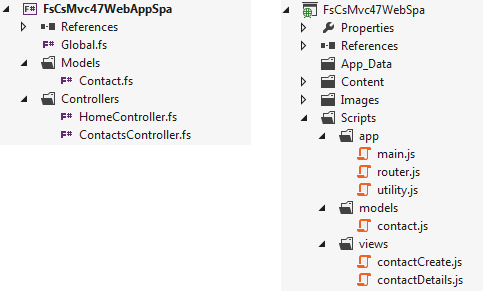
Highlights of the F# and C# project structure are shown below:
If you wish to learn more about the solution that is generated from this new template, see my previous post.
Labels:
ASP.NET MVC 4,
Backbone,
F#,
Project Templates,
SIngle Page Application,
SPA
Thursday, September 27, 2012
A Single Page App with Backbone.js, ASP.NET Web API, and F#
In this post, I introduce a simple example of a single page application built with Backbone.js, ASP.NET Web API, F#, and more. The example is an overly simple contacts app that allows you to view contacts and create new ones. It uses the Foundation 3 framework for styling and responsive design.
Here's a screenshot of the simple contact list view:
Solution Organization:
The C# project contains the following:
The heart of the client-side code is broken into 3 folders within the Scripts folder of the C# project:
The F# project contains the following:
Getting the Code:
You can find the full source at https://github.com/dmohl/FsWebSpa-Backbone.
EDIT: You can find a C# version at https://github.com/downloads/dmohl/FsWebSpa-Backbone/SpaBackbone-CSharp.zip. CodeProject
Here's a screenshot of the simple contact list view:
Solution Organization:
The C# project contains the following:
- A single Index.cshtml file.
- All images, CSS, and JavaScript.
- A "Templates" folder that contains 2 .htm files that hold the markup for each view. The templating feature of underscore.js is used to allow placeholders in the templates to be replaced with the desired data.
The heart of the client-side code is broken into 3 folders within the Scripts folder of the C# project:
- The "app" folder contains a main.js, a utility.js, and a file containing route definitions using Backbone.Router.
- The "models" folder contains the Backbone models and collections.
- The "views" folder contains Backbone views.
The F# project contains the following:
- ASP.NET MVC and Web API routes.
- Definitions of JS and CSS bundles.
- ASP.NET MVC and Web API Controllers.
- A Model class.
Getting the Code:
You can find the full source at https://github.com/dmohl/FsWebSpa-Backbone.
EDIT: You can find a C# version at https://github.com/downloads/dmohl/FsWebSpa-Backbone/SpaBackbone-CSharp.zip. CodeProject
Labels:
#fsharp,
ASP.NET Web API,
Backbone,
Backbone.js,
Web API
Thursday, September 20, 2012
Adding NuGet Support to F# Interactive in VS2012
About a year ago, I posted an approach for adding basic NuGet support to VS2010. This post provides an updated script for adding this support in VS2012.
The first step that we’ll need to do is create an F# script that is able to interact with the official NuGet package source. The script found here does the trick. I won’t spend too much time explaining the code in this script, but at a high level this allows you to use the F# Interactive window to talk to the NuGet package source, pull down packages, and automatically add a reference to the F# script file that has focus.
Disclaimer: There are a few known issues with this approach.
There may be times when you wish to use NuGet from the F# Interactive, such as when you are creating F# scripts. Since NuGet focuses on Visual Studio projects, this functionality is not supported out-of-the-box; however, it’s fairly simple to get things up and running.
The first step that we’ll need to do is create an F# script that is able to interact with the official NuGet package source. The script found here does the trick. I won’t spend too much time explaining the code in this script, but at a high level this allows you to use the F# Interactive window to talk to the NuGet package source, pull down packages, and automatically add a reference to the F# script file that has focus.
The last step to accomplish our goal, is to tell F# Interactive to run our script each time that it launches. This is pretty easy to do thanks to the functionality provided by Visual Studio for adding F# Interactive options. To set the applicable option, go to Tools | Options | F# Tools | F# Interactive. You can then add the following information to the F# Interactive options setting.
--use:C:\temp\fsiext.fsx
The F# Interactive options window looks like the following after making this change:
Once this is in place you can do something like this:
- Create a new F# Library project and build it.
- Open the Script.fsx file.
- Navigate to the F# Interactive window.
- Execute InstallPackage “FSPowerPack.Core.Community”;; in the F# Interactive.
This will cause the package to be pulled down from the official NuGet repository and will automatically add the appropriate references to the Script.fsx file.
Here's what the screen should look like after completing these steps.
Disclaimer: There are a few known issues with this approach.
Wednesday, September 12, 2012
F# Templates and F# Tools for VS2012 Express for Web
It's been a great day in the world of F# + web development. Today the F# team announced the F# Tools for Visual Studio 2012 Express for Web. This tool set now makes it easier than ever to create web applications that use F# for the server-side heavy lifting. Congrats to the F# team on this great accomplishment!
Currently, I've updated 4 of the more common F# web project templates to support this new version. These include:
- F# C# MVC 4 - Which includes ASP.NET MVC 4 (Razor and ASPX) and ASP.NET Web API
- F# C# ASP.NET MVC 3 - Which includes ASP.NET MVC 3 (Razor and ASPX)
- F# and C# Web Services (ASP.NET, WSDL)
- F# MsTest Project
Happy coding!
Currently, I've updated 4 of the more common F# web project templates to support this new version. These include:
- F# C# MVC 4 - Which includes ASP.NET MVC 4 (Razor and ASPX) and ASP.NET Web API
- F# C# ASP.NET MVC 3 - Which includes ASP.NET MVC 3 (Razor and ASPX)
- F# and C# Web Services (ASP.NET, WSDL)
- F# MsTest Project
Happy coding!
Subscribe to:
Posts (Atom)