About a month ago, I announced that most of the existing F# project templates on Visual Studio Gallery had been updated to include support for Visual Studio 11. In that post, I mentioned some new item templates that had been included in the update to the F# XAML Item Templates extension. This post provides a bit more information related to that update.
The F# XAML Item Templates extension was designed to make working with F# + WPF and Silverlight a little eaiser. I provided a brief overview of these features back in June. However, Windows Phone XAML related development was still lacking. The previous approach to adding XAML files was to either create a blank file, change the extension, and manually add the appropriate starting XAML or create the XAML from one of the C# item templates, remove the code-behind files, and tweak the resulting XAML. While neither of these options is extremely time consuming, it can quickly become annoying.
The latest update to this Visual Studio extension reduces this annoyance by providing F# Windows Phone 7 XAML item templates. Once this VSIX is installed, you can add a Windows Phone 7 XAML file by doing the following:
1. In a Windows Phone F# project, proceed with adding a new item as you normally would (i.e. Ctrl+Shift+A).
2. The resulting wizard (shown below) includes several new item templates starting with "F#..." that match the C# versions, but that do not generate C# code-behind files.
While you still have to write the small amount of F# code to wire this up, it makes life a little bit easier.
Showing posts with label Silverlight. Show all posts
Monday, January 23, 2012
Thursday, November 24, 2011
Building F# Solutions in Visual Studio 11
I love to learn about new technology, seek to continually improve, and always look for ways to make things easier. I then do all that I can to share the knowledge, code, and/or tools that help to achieve these goals. With these goals in mind, I've joined with several friends in the creation of a new blogging community named Fresh Brewed Code. I'd strongly recommend keeping a close eye on the other Fresh Brewed Coders, as they will be producing some awesome content. You can see the announcement at http://freshbrewedcode.com/blog/2011/11/23/welcome-to-fresh-brewed-code/.
One of the other ways that I have attempted to achieve the goals mentioned above is through the creation of a number of Visual Studio project and item templates. Over the last several days, there have been updates to almost all of these templates. In this post I'll describe the changes that have been made--most of which have been implemented to allow support for the Developer Preview of Visual Studio 11 and F# 3.0.
I'm sure that you have used Visual Studio Gallery by now, but just in case you haven't yet had the chance, see http://bloggemdano.blogspot.com/2010/08/f-templates-now-on-visual-studio.html for how to get started. A screenshot of the Online templates view from the Developer Preview of Visual Studio 11 is shown below:
ASP.NET MVC:
F# and C# ASP.NET MVC3 - This project template generates the standard ASP.NET MVC 3 template output with separate projects for the view (ASPX in a C# project) and controllers/models (in a F# project). The latest release (version 1.3) adds support for Visual Studio 11 and F# 3.0. You will need to install the ASP.NET MVC 3 Tools Update (see http://www.asp.net/mvc/mvc3 and make sure to download/install the correct version for Visual Studio 10 or Visual Studio 11) to use this template.
F# C# MVC 3 - This is a dynamic project template that generates an empty ASP.NET MVC 3 solution with separate projects for view (C# - either ASPX or Razor), core (F#), and an optional F# project for unit tests. The template is based on the MSDN Magazine article entitled "Authoring an F#/C# VSIX Project Template" which can be found at http://msdn.microsoft.com/en-us/magazine/hh456399.aspx. You will need to install the ASP.NET MVC 3 Tools Update (see http://www.asp.net/mvc/mvc3 and make sure to download/install the correct version for Visual Studio 10 or Visual Studio 11) to use this template. Version 1.1 adds support for Visual Studio 11 and F# 3.0.
WPF:
F# Windows App (WPF, MVVM) - This project template generates a F# WPF solution with logical separation between View, ViewModel, Model, and Repository. The latest release (version 1.8) resolves a few bugs and adds support for Visual Studio 11 and F# 3.0.
F# and C# Windows App (WPF, MVVM) - This is a project template that generates a WPF solution with separation between View (C#), ViewModel (F#), Model (F#), and Repository (F#). The latest release (version 1.7) resolves a few bugs and adds support for Visual Studio 11 and F# 3.0.
Web Service:
F# and C# Web Service (ASP.NET, WSDL) - This is a project template that generates a Web Service (WSDL) solution with separate projects for web (C#), services (F#), and contracts (F#). The underlying technology is Windows Communication Foundation. Version 1.5 adds support for Visual Studio 11 and F# 3.0.
Silverlight:
F# C# Web App (Silverlight) - This project template generates a Silverlight solution with separate projects for View (C#) and Core (F#). The Core project includes logical separation between ViewModel, Model, and RemoteFacade. You should install the Silverlight 4 developer tools and/or the Silverlight 5 developer tools plus the April 2011 F# CTP. Version 1.2 adds support for Visual Studio 11 and includes a template wizard dialog that allows selection of Silverlight version 4 or 5. The determination of whether to display the wizard dialog is triggered off of the installed F# Silverlight client version. It will only display if both 4 and 5 are installed. Note: There are not yet F# 3.0 Silverlight DLLs. Because of this, the current version only support F# 2.0.
F# Web Application (Silverlight) - This F# project template generates a Silverlight project with logical separation between View, ViewModel, Model, and RemoteFacade. You should install the Silverlight 4 developer tools and/or the Silverlight 5 developer tools plus the April 2011 F# CTP. Version 1.4 adds support for Visual Studio 11 and includes a dialog that allows selection of the desired Silverlight Version 4 or 5 (depending on installations). Note: There are not yet F# 3.0 Silverlight DLLs. Because of this, the current version only support F# 2.0.
F# Empty Web Application (Silverlight) - This project template is similar to the F# Web Application (Silverlight) template; however, it does not include all of the example code. You should install the Silverlight 4 developer tools and/or the Silverlight 5 developer tools plus the April 2011 F# CTP. Version 1.1 adds support for Visual Studio 11, removes the C# host application, adds support to generate an HTML test file, and provides functionality to select the desired Silverlight version 4 or 5 (depending on the installation). Note: There are not yet F# 3.0 Silverlight DLLs. Because of this, the current version only support F# 2.0.
F# 2.0 Silverlight Library (for Visual Studio 11) - This is a project template that generates a F# 2.0 Silverlight project. It targets Visual Studio 11 only and will only be needed temporarily. You can read more about this template at http://bloggemdano.blogspot.com/2011/11/f-silverlight-library-template-in.html. Note: There are not yet F# 3.0 Silverlight DLLs. Because of this, the current version only support F# 2.0.
XAML Item Templates:
F# XAML Item Templates - This Visual Studio Extension provides a number of item templates that make working with F# XAML based projects (i.e. the WPF, Silverlight, and/or Windows Phone 7 project templates) much easier. Without these item templates adding new XAML files to one of these projects is a bit of a pain. You have to create a text or xml file, change the extension to .xaml, manually add the default XAML code, and change the Build Action for the .xaml file to Resource. Version 1.1 adds item templates for Windows Phone 7 (I'll talk more about this in a future post) and adds support for Visual Studio 11.
Project Templates That Do Not Currently Support Visual Studio 11:
Since the Developer Preview of Visual Studio 11 does not currently support Windows Phone 7 development, the Windows Phone 7 templates (i.e. C# WP7 with Caliburn.Micro, F# and C# Win Phone App (Silverlight), F# and C# Win Phone List App (Silverlight), and F# and C# Win Phone Panorama) have not yet been updated to support Visual Studio 11. This will be added as soon as a release of Visual Studio 11 is provided that does include this support.
F# and C# Web App (ASP.NET, MVC 2) - There is not currently an ASP.NET MVC 2 install for Visual Studio 11 and I don't anticipate one to ever be provided. Because of this, I have not (and do not intend to) add support for Visual Studio 11 to this project template.
One of the other ways that I have attempted to achieve the goals mentioned above is through the creation of a number of Visual Studio project and item templates. Over the last several days, there have been updates to almost all of these templates. In this post I'll describe the changes that have been made--most of which have been implemented to allow support for the Developer Preview of Visual Studio 11 and F# 3.0.
I'm sure that you have used Visual Studio Gallery by now, but just in case you haven't yet had the chance, see http://bloggemdano.blogspot.com/2010/08/f-templates-now-on-visual-studio.html for how to get started. A screenshot of the Online templates view from the Developer Preview of Visual Studio 11 is shown below:
ASP.NET MVC:
F# and C# ASP.NET MVC3 - This project template generates the standard ASP.NET MVC 3 template output with separate projects for the view (ASPX in a C# project) and controllers/models (in a F# project). The latest release (version 1.3) adds support for Visual Studio 11 and F# 3.0. You will need to install the ASP.NET MVC 3 Tools Update (see http://www.asp.net/mvc/mvc3 and make sure to download/install the correct version for Visual Studio 10 or Visual Studio 11) to use this template.
F# C# MVC 3 - This is a dynamic project template that generates an empty ASP.NET MVC 3 solution with separate projects for view (C# - either ASPX or Razor), core (F#), and an optional F# project for unit tests. The template is based on the MSDN Magazine article entitled "Authoring an F#/C# VSIX Project Template" which can be found at http://msdn.microsoft.com/en-us/magazine/hh456399.aspx. You will need to install the ASP.NET MVC 3 Tools Update (see http://www.asp.net/mvc/mvc3 and make sure to download/install the correct version for Visual Studio 10 or Visual Studio 11) to use this template. Version 1.1 adds support for Visual Studio 11 and F# 3.0.
WPF:
F# Windows App (WPF, MVVM) - This project template generates a F# WPF solution with logical separation between View, ViewModel, Model, and Repository. The latest release (version 1.8) resolves a few bugs and adds support for Visual Studio 11 and F# 3.0.
F# and C# Windows App (WPF, MVVM) - This is a project template that generates a WPF solution with separation between View (C#), ViewModel (F#), Model (F#), and Repository (F#). The latest release (version 1.7) resolves a few bugs and adds support for Visual Studio 11 and F# 3.0.
Web Service:
F# and C# Web Service (ASP.NET, WSDL) - This is a project template that generates a Web Service (WSDL) solution with separate projects for web (C#), services (F#), and contracts (F#). The underlying technology is Windows Communication Foundation. Version 1.5 adds support for Visual Studio 11 and F# 3.0.
Silverlight:
F# C# Web App (Silverlight) - This project template generates a Silverlight solution with separate projects for View (C#) and Core (F#). The Core project includes logical separation between ViewModel, Model, and RemoteFacade. You should install the Silverlight 4 developer tools and/or the Silverlight 5 developer tools plus the April 2011 F# CTP. Version 1.2 adds support for Visual Studio 11 and includes a template wizard dialog that allows selection of Silverlight version 4 or 5. The determination of whether to display the wizard dialog is triggered off of the installed F# Silverlight client version. It will only display if both 4 and 5 are installed. Note: There are not yet F# 3.0 Silverlight DLLs. Because of this, the current version only support F# 2.0.
F# Web Application (Silverlight) - This F# project template generates a Silverlight project with logical separation between View, ViewModel, Model, and RemoteFacade. You should install the Silverlight 4 developer tools and/or the Silverlight 5 developer tools plus the April 2011 F# CTP. Version 1.4 adds support for Visual Studio 11 and includes a dialog that allows selection of the desired Silverlight Version 4 or 5 (depending on installations). Note: There are not yet F# 3.0 Silverlight DLLs. Because of this, the current version only support F# 2.0.
F# Empty Web Application (Silverlight) - This project template is similar to the F# Web Application (Silverlight) template; however, it does not include all of the example code. You should install the Silverlight 4 developer tools and/or the Silverlight 5 developer tools plus the April 2011 F# CTP. Version 1.1 adds support for Visual Studio 11, removes the C# host application, adds support to generate an HTML test file, and provides functionality to select the desired Silverlight version 4 or 5 (depending on the installation). Note: There are not yet F# 3.0 Silverlight DLLs. Because of this, the current version only support F# 2.0.
F# 2.0 Silverlight Library (for Visual Studio 11) - This is a project template that generates a F# 2.0 Silverlight project. It targets Visual Studio 11 only and will only be needed temporarily. You can read more about this template at http://bloggemdano.blogspot.com/2011/11/f-silverlight-library-template-in.html. Note: There are not yet F# 3.0 Silverlight DLLs. Because of this, the current version only support F# 2.0.
XAML Item Templates:
F# XAML Item Templates - This Visual Studio Extension provides a number of item templates that make working with F# XAML based projects (i.e. the WPF, Silverlight, and/or Windows Phone 7 project templates) much easier. Without these item templates adding new XAML files to one of these projects is a bit of a pain. You have to create a text or xml file, change the extension to .xaml, manually add the default XAML code, and change the Build Action for the .xaml file to Resource. Version 1.1 adds item templates for Windows Phone 7 (I'll talk more about this in a future post) and adds support for Visual Studio 11.
Project Templates That Do Not Currently Support Visual Studio 11:
Since the Developer Preview of Visual Studio 11 does not currently support Windows Phone 7 development, the Windows Phone 7 templates (i.e. C# WP7 with Caliburn.Micro, F# and C# Win Phone App (Silverlight), F# and C# Win Phone List App (Silverlight), and F# and C# Win Phone Panorama) have not yet been updated to support Visual Studio 11. This will be added as soon as a release of Visual Studio 11 is provided that does include this support.
F# and C# Web App (ASP.NET, MVC 2) - There is not currently an ASP.NET MVC 2 install for Visual Studio 11 and I don't anticipate one to ever be provided. Because of this, I have not (and do not intend to) add support for Visual Studio 11 to this project template.
Saturday, November 12, 2011
F# Silverlight Library Template in Visual Studio 11
If you have played with Visual Studio 11 much, you may have noticed that there isn't a F# Silverlight Library template out-of-the-box. This is presumably due to the fact that the current release of Visual Studio 11 is just a developer preview and there doesn't appear to be a version of F# 3.0 for Silverlight just yet. However, this doesn't stop you from creating Silverlight projects that target F# 2.0 in Visual Studio 11. In order to help you do this, I've created a project template that allows you to create a F# 2.0 Silverlight Library in Visual Studio 11. You can download the VSIX from here.
The following prerequisites exist for using this library:
1. Download and install the VS2011 Preview with F# 3.0 (see http://blogs.msdn.com/b/fsharpteam/archive/2011/09/14/f-3-0-developer-preview-now-available.aspx for more information).
2. Download and install the Microsoft F#, April 2011 CTP from http://www.microsoft.com/download/en/details.aspx?id=11100.
Tuesday, July 5, 2011
A Few Items of Note
In this post, I'm going to highlight a few things that I have been working on that aren't big enough to warrant their own blog entry, but that are worth pointing out. Note: If you follow me on Twitter (i.e. @dmohl) you may have already heard about these things.
1. In Feb. of this year, I blogged about the F# PowerPack being added to NuGet gallery. Since that time, there have been several requests to add the .NET 4 binaries to that NuGet package. I'm happy to say that a new version of the FSPowerPack.Community package has been uploaded that includes these binaries.
2. In Jan. of this year, an F# ASP.NET MVC 3 template was announced. There have been a few reports of an exception on some operating systems during the extension installation that points to a specific path that is too long. For those of you who are experiencing this error, there is a VSIX with a reduced path length available for download at https://sites.google.com/site/danodocs/Home/FSMVC3_min.vsix.
3. Have you visited the F# Snippets site yet? If not, I strongly recommend checking it out. While you are there, have a look at the WPF/Silverlight Value Converter base class and sample concrete implementation as well as an example of a WPF/Silverlight Attached Property. I'd love to hear what you think. Along these lines, I've been working on a few additions to the F# WPF templates that have been announced on this blog. If you have any enhancement requests, send them my way.
1. In Feb. of this year, I blogged about the F# PowerPack being added to NuGet gallery. Since that time, there have been several requests to add the .NET 4 binaries to that NuGet package. I'm happy to say that a new version of the FSPowerPack.Community package has been uploaded that includes these binaries.
2. In Jan. of this year, an F# ASP.NET MVC 3 template was announced. There have been a few reports of an exception on some operating systems during the extension installation that points to a specific path that is too long. For those of you who are experiencing this error, there is a VSIX with a reduced path length available for download at https://sites.google.com/site/danodocs/Home/FSMVC3_min.vsix.
3. Have you visited the F# Snippets site yet? If not, I strongly recommend checking it out. While you are there, have a look at the WPF/Silverlight Value Converter base class and sample concrete implementation as well as an example of a WPF/Silverlight Attached Property. I'd love to hear what you think. Along these lines, I've been working on a few additions to the F# WPF templates that have been announced on this blog. If you have any enhancement requests, send them my way.
Labels:
ASP.NET MVC,
F#,
fsharp,
NuGet,
PowerPack,
Silverlight,
WPF
Thursday, June 30, 2011
F# XAML Item Templates Now on Visual Studio Gallery
A new VS2010 extension is now available on Visual Studio Gallery that provides several XAML related item templates for F# projects. The provided item templates include Window for WPF as well as Page, UserControl, and ResourceDictionary for Silverlight and WPF.
To get started, do the following:
1. Download and install the extension from http://visualstudiogallery.msdn.microsoft.com/06c6ece1-2084-4083-a0f7-934fce9d22fb or through the Extention Manager in Visual Studio 2010 as shown below (Extension Manager can be found under Tools -> Extension Manager..):
2. Once installed, you will see the following option available in the Add New Item wizard for F# Silverlight projects:
3. For F# WPF projects, the Add New Item wizard will look like the following:
These item templates complement the existing F# WPF and Silverlight project templates quite well. Here is a list of a few of these project templates that are currently available on Visual Studio Gallery:
F# Web Application (Silverlight)
WPF:
F# App Template with Theme
F# Windows App (WPF, MVVM)
F# WPF Application
As usual you can find the source on my github (https://github.com/dmohl/FsXAMLItemTemplate).
To get started, do the following:
1. Download and install the extension from http://visualstudiogallery.msdn.microsoft.com/06c6ece1-2084-4083-a0f7-934fce9d22fb or through the Extention Manager in Visual Studio 2010 as shown below (Extension Manager can be found under Tools -> Extension Manager..):
2. Once installed, you will see the following option available in the Add New Item wizard for F# Silverlight projects:
3. For F# WPF projects, the Add New Item wizard will look like the following:
These item templates complement the existing F# WPF and Silverlight project templates quite well. Here is a list of a few of these project templates that are currently available on Visual Studio Gallery:
Silverlight:
WPF:
F# App Template with Theme
F# Windows App (WPF, MVVM)
F# WPF Application
As usual you can find the source on my github (https://github.com/dmohl/FsXAMLItemTemplate).
Thursday, January 20, 2011
New F# Empty Web Application (Silverlight) Template
There is a new F# Silverlight application template up on Visual Studio Gallery that generates an "empty" Silverlight solution. The generated solution provides the necessary structure to start F# Silverlight development, but does not include any sample code. While the previously provided F# Silverlight template (discussed at http://bloggemdano.blogspot.com/2010/08/f-silverlight-template.html) provides a nice example, it's not always useful if you have a need for an entirely different type of application.
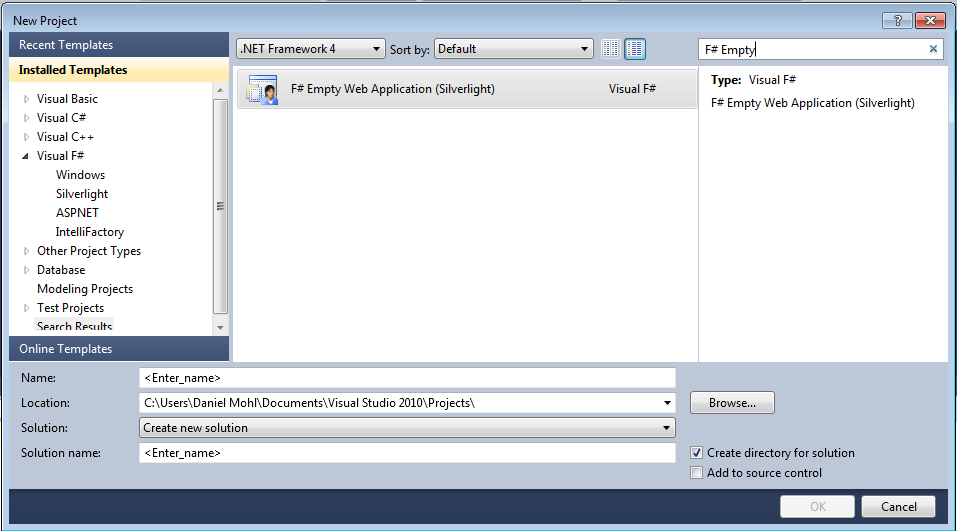
The new F# Empty Web Application (Silverlight) template can be downloaded from the web or through the Online Templates feature of Visual Studio 2010.
Here are the steps: (Note: Visual Studio 2010 Professional (or above) is required to use this template.)
1. In Visual Studio 2010, navigate to File -> New and select Online Templates.
2. Search for "Daniel Mohl" or "F# Empty Web Application (Silverlight)":
As with most of the things posted on this blog, you can find the full source used to create this template on my GitHub site.
The new F# Empty Web Application (Silverlight) template can be downloaded from the web or through the Online Templates feature of Visual Studio 2010.
Here are the steps: (Note: Visual Studio 2010 Professional (or above) is required to use this template.)
1. In Visual Studio 2010, navigate to File -> New and select Online Templates.
2. Search for "Daniel Mohl" or "F# Empty Web Application (Silverlight)":
As with most of the things posted on this blog, you can find the full source used to create this template on my GitHub site.
Monday, September 6, 2010
Pure-F# Templates Now Support the Visual Studio 2010 Shell SKU
I've been meaning to write this post for a few weeks now. With the announcement of the F# 2.0 standalone tools update for Visual Studio 2010 Shell, I have updated the pure-F# templates to support the IntegratedShell SKU. This includes templates F# Windows App (WPF, MVVM) and F# Web Application (Silverlight). Note: The F# Web Application template includes a C# application for the purpose of providing a hosting example. This C# hosting application will not be created successfully when using only the F# 2.0 standalone tools with Visual Studio 2010 Shell. Since this is not essential for the development of the actual Silverlight application, I decided to include IntegratedShell SKU support for this template with this as a known limitation.
Labels:
F#,
Integrated Shell,
Silverlight,
VS2010 Template,
WPF
Thursday, August 19, 2010
F# Windows Phone 7 (Silverlight) Templates Now On Visual Studio Gallery
Over the last few days, I've been working to put together a few Visual Studio 2010 Online Templates to help kick start development of Windows Phone 7 (WP7) applications in F#. These templates are now available on Visual Studio Gallery.
Follow these steps to get started:
(Note: Visual Studio 2010 Professional (or above) is required to use these templates.)
1. Download and install the Windows Phone Developer Tools.
2. In Visual Studio 2010, navigate to File -> New and select Online Templates.
3. Search for "Daniel Mohl" or "F# and C# Win Phone" (a sample is below):
As always, I'd love to hear your feedback on these templates as well as ideas for others that you would like to see.
Follow these steps to get started:
(Note: Visual Studio 2010 Professional (or above) is required to use these templates.)
1. Download and install the Windows Phone Developer Tools.
2. In Visual Studio 2010, navigate to File -> New and select Online Templates.
3. Search for "Daniel Mohl" or "F# and C# Win Phone" (a sample is below):
Note: The WP7 FSharp.Core.dll has been included as part of these templates. It is also part of the Microsoft F# August 2010 CTP.
As always, I'd love to hear your feedback on these templates as well as ideas for others that you would like to see.
Tuesday, August 10, 2010
A F# Silverlight Template
In my last post I pointed out that the five templates that have been previously announced on this blog are now available on Visual Studio Gallery. In this post, the count is being raised to six. Thanks to Don Syme and a few others, a new "all F#" Silverlight template has been packaged and placed on Visual Studio Gallery.
Here's a description of the template:
"This is a F# project template that generates a Silverlight solution with logical separation between View, ViewModel, Model, and RemoteFacade. While the Silverlight application is built entirely in F#, a C# web application is included for the purpose of providing a hosting example. "
You can get this template by doing the following:
1. In Visual Studio 2010, go to File -> New and select Online Templates
2. Search for Daniel Mohl or "F# Web Application (Silverlight)".
Here's a description of the template:
"This is a F# project template that generates a Silverlight solution with logical separation between View, ViewModel, Model, and RemoteFacade. While the Silverlight application is built entirely in F#, a C# web application is included for the purpose of providing a hosting example. "
You can get this template by doing the following:
1. In Visual Studio 2010, go to File -> New and select Online Templates
2. Search for Daniel Mohl or "F# Web Application (Silverlight)".
Labels:
F#,
Silverlight,
Visual Studio Gallery,
VS2010 Template
Wednesday, July 28, 2010
An F# Silverlight MVVM Multi-Project Template
In the spirit of continuing to build up set of project templates for F#, I've created an F# Silverlight MVVM multi-project template.
Here are the links to the other templates that have been announced on this blog:
- WPF MVVM Multi-Project Template: A Polyglot Approach
- An F# WPF MVVM Project Template
- Standard WCF Template
- Standard ASP.NET MVC 2 Template
The code provided by this multi-project template creates an application that is very similar to the output of the previously metioned F# WPF templates.
It looks something like this:
The following list shows the high level code changes that were needed to port the polyglot WPF template to Silverlight:
- Created new projects from the default C# and F# Silverlight 4 project templates.
- Made several revisions related to XAML resources.
- Changed the DataGrid control and Label controls to the Silverlight versions.
You can download the template here and find the full source at http://github.com/dmohl/FSharpSilverlightMVVMTemplate.
Here are the links to the other templates that have been announced on this blog:
- WPF MVVM Multi-Project Template: A Polyglot Approach
- An F# WPF MVVM Project Template
- Standard WCF Template
- Standard ASP.NET MVC 2 Template
The code provided by this multi-project template creates an application that is very similar to the output of the previously metioned F# WPF templates.
It looks something like this:
The following list shows the high level code changes that were needed to port the polyglot WPF template to Silverlight:
- Created new projects from the default C# and F# Silverlight 4 project templates.
- Made several revisions related to XAML resources.
- Changed the DataGrid control and Label controls to the Silverlight versions.
You can download the template here and find the full source at http://github.com/dmohl/FSharpSilverlightMVVMTemplate.
Subscribe to:
Posts (Atom)