Sunday, January 23, 2011

FSRepository - A New NuGet Package

UPDATED: NuGet Package Manager 1.1 (release today - 2/12/2011) now supports F#!

A new NuGet package is now available in the NuGet gallery called FSRepository. This package adds a few F# source files and assembly references to your F# project so that EFCodeFirst 0.8 can be used for data access.

What is NuGet?
If you haven't heard, "NuGet is a Visual Studio extension that makes it easy to install and update open source libraries and tools in Visual Studio. When you use NuGet to install a package, it copies the library files to your solution and automatically updates your project (add references, change config files, etc). If you remove a package, NuGet reverses whatever changes it made so that no clutter is left." (http://www.nuget.org/)

What is EFCodeFirst?
I first heard about EFCodeFirst in a blog post by Steve Sanderson. In that post he states "In case you’re wondering, EFCodeFirst is the new super-elegant version of Entity Framework that persists plain .NET objects to a relational database without any configuration fuss...".

How Do I Use FSRepository 0.4?
Support for F# projects was added to NuGet by David Fowler on 1/20/2011. Because this is such a recent addition, the version of the NuGet Package Manager on Visual Studio Gallery doesn't yet have this functionality. However, you can get the latest from http://nuget.codeplex.com/ to create a version of the visual studio extension that contains this functionality (or just wait for a few days/weeks until the next version is released on Visual Studio Gallery). If neither of these options work for you, shoot me an email and we can discuss alternatives.

Once a version of NuGet Package Manager that includes support for F# projects is installed, you can install the FSRepository 0.3 package by doing the following:

1. Create or open a F# project.
2. Open the Package Manager Console window (this can be found in Visual Studio 2010 under View -> Other Windows -> Package Manager Console).
3. In the Package Manager Console, type "Install-Package FSRepository":

4. Hit "Enter" and wait for several seconds until you see something like this:


As long as there were no errors, your F# project should now contain the new assembly references and F# source files.


You can find the files that were used to create this NuGet package on my GitHub.

Thursday, January 20, 2011

New F# Empty Web Application (Silverlight) Template

There is a new F# Silverlight application template up on Visual Studio Gallery that generates an "empty" Silverlight solution. The generated solution provides the necessary structure to start F# Silverlight development, but does not include any sample code. While the previously provided F# Silverlight template (discussed at http://bloggemdano.blogspot.com/2010/08/f-silverlight-template.html) provides a nice example, it's not always useful if you have a need for an entirely different type of application.

The new F# Empty Web Application (Silverlight) template can be downloaded from the web or through the Online Templates feature of Visual Studio 2010.

Here are the steps: (Note: Visual Studio 2010 Professional (or above) is required to use this template.)

1. In Visual Studio 2010, navigate to File -> New and select Online Templates.
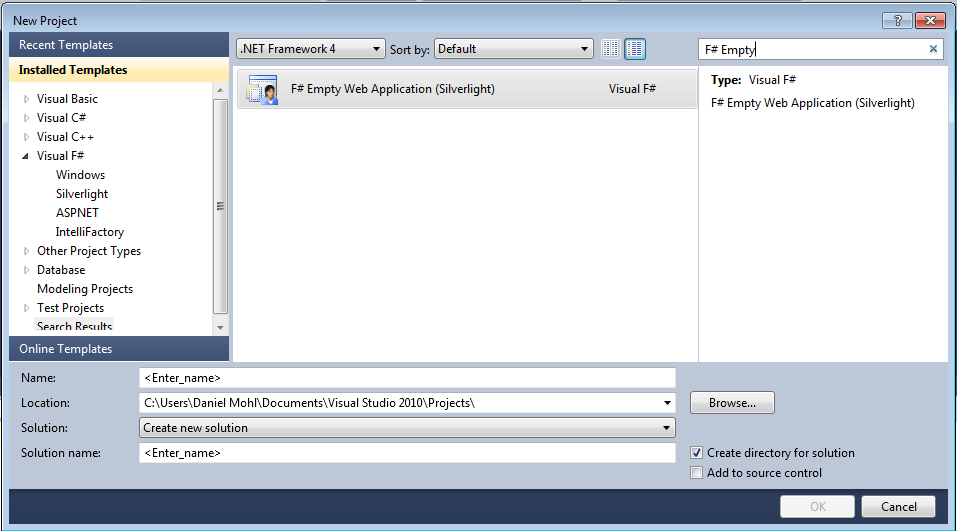
2. Search for "Daniel Mohl" or "F# Empty Web Application (Silverlight)":


As with most of the things posted on this blog, you can find the full source used to create this template on my GitHub site.

Sunday, January 16, 2011

New F# ASP.NET MVC 3 Template on Visual Studio Gallery

There is a new F# ASP.NET MVC 3 project template on Visual Studio Gallery. This template is a version of the F# ASP.NET MVC 2 project template that has been migrated to ASP.NET MVC 3. ASP.NET MVC 3 has several cool new features. Check out http://haacked.com/archive/2011/01/13/aspnetmvc3-released.aspx and http://www.asp.net/mvc/mvc3 for more information.

To get started, do the following (Note: Visual Studio 2010 Professional (or above) is required to use these templates):

1. Install ASP.NET MVC 3. View http://www.asp.net/mvc/mvc3 for more information.
2. In Visual Studio 2010, go to File -> New and select Online Templates.
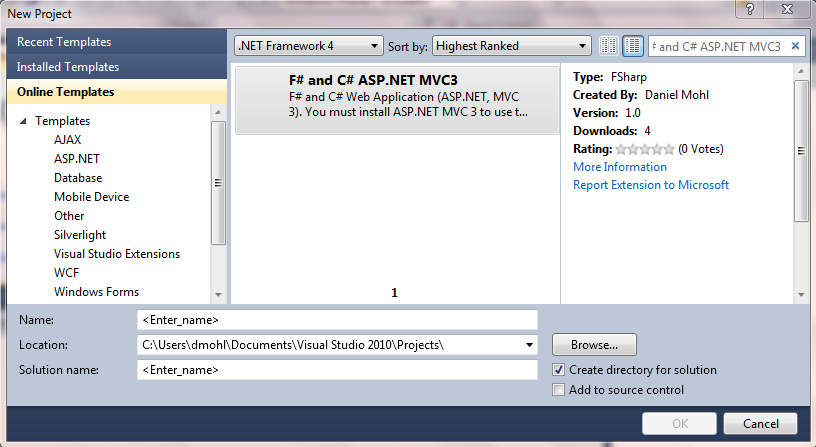
3. Search for Daniel Mohl or "F# and C# ASP.NET MVC3":


As usual, you can find the full solution used to create this template on my GitHub.

Sunday, November 14, 2010

Side-by-Side Asynchronous Programming Example in F#, C#, and VB

I was pleased to hear the announcement at PDC2010 by Anders Hejlsberg that C# and VB will likely be following the lead of F# by including asynchronous programming support. As Don Syme states in his post on this topic "the proposed design of C# and VB asynchronous programming is pleasant and simple, and heavily inspired by the corresponding feature of F#". In this post I will provide a simple example in F#, C#, and VB. The provided example is based on an example from a post by Don entitled "Async and Parallel Design Patterns in F#: Parallelizing CPU and I/O Computations". This example is also very similar to those provided in a series of posts on this topic by Tomas Petricek. I strongly recommend reading Don's post as well as Tomas's series.

F#:
open System
open System.IO
open System.Net

let getHtml url printStrategy =
    async { let request =  WebRequest.Create(Uri url)
            use! response = request.AsyncGetResponse()
            use stream = response.GetResponseStream()
            use reader = new StreamReader(stream)
            let contents = reader.ReadToEnd()
            do printStrategy url contents
            return contents }
 
let sites = ["http://www.bing.com";
             "http://www.google.com";
             "http://www.yahoo.com";
             "http://msdn.microsoft.com/en-us/fsharp/default.aspx"]

let printStrategy url (contents:string) =  
    printfn "%s - HTML Length %d" url contents.Length

let sitesHtml = Async.Parallel [for site in sites -> getHtml site printStrategy]
                |> Async.RunSynchronously

do printfn "\r\nProcess Complete\r\nPress any key to continue"

do Console.ReadLine() |> ignore

C#:
using System;
using System.IO;
using System.Net;
using System.Threading.Tasks;
using System.Linq;

namespace CSharpAsync
{
    class Program
    {
        static async Task<string> GetHtml(string url, 
            Action<string, string> printStrategy)
        {
            var request = WebRequest.Create(new Uri(url));
            using (var response = await request.GetResponseAsync())
            {
                using (var stream = response.GetResponseStream())
                {
                    using (var reader = new StreamReader(stream))
                    {
                        var contents = reader.ReadToEnd();
                        printStrategy.Invoke(url, contents);
                        return contents;
                    }
                }
            }        
        }

        static async Task ProcessSites(string[] sites, 
            Action<string, string> printStrategy)
        {
            var sitesHtml = 
                await TaskEx.WhenAll(
                    sites.Select(site => GetHtml(site, printStrategy)));
            Console.WriteLine("\r\nProcess Complete\r\nPress any key to continue");
        }

        static void Main(string[] args)
        {
            var sites = new[] { "http://www.bing.com",
                            "http://www.google.com",
                            "http://www.yahoo.com",
                            "http://msdn.microsoft.com/en-us/fsharp/default.aspx" };

            Action<string, string> printStrategy =
                (url, contents) =>
                    Console.WriteLine("{0} - HTML Length {1}", url, contents.Length);
            
            ProcessSites(sites, printStrategy).Wait();

            Console.ReadLine();
        }
    }
}

VB:
Imports System
Imports System.IO
Imports System.Net
Imports System.Threading.Tasks
Imports System.Linq

Module Module1

    Async Function GetHtml(ByVal url As String, ByVal printStrategy As Action(Of String, String)) As Task(Of String)
        Dim request = WebRequest.Create(New Uri(url))
        Using response = Await request.GetResponseAsync()
            Using stream = response.GetResponseStream()
                Using reader = New StreamReader(stream)
                    Dim contents = reader.ReadToEnd()
                    printStrategy.Invoke(url, contents)
                    Return contents
                End Using
            End Using
        End Using
    End Function

    Async Function ProcessSites(ByVal sites As String(), ByVal printStrategy As Action(Of String, String)) As Task
        Dim sitesHtml = _
            Await TaskEx.WhenAll(sites.Select(Function(site) GetHtml(site, printStrategy)))
        Console.WriteLine("{0}Process Complete{0}Press any key to continue", _
            Environment.NewLine)
    End Function

    Sub Main()
        Dim sites = New String() {"http://www.bing.com", _
                "http://www.google.com", _
                "http://www.yahoo.com", _
                "http://msdn.microsoft.com/en-us/fsharp/default.aspx"}

        Dim printStrategy As Action(Of String, String) = _
            Sub(url, contents) Console.WriteLine("{0} - HTML Length {1}", url, contents.Length)
        ProcessSites(sites, printStrategy).Wait()
        Console.ReadLine()
    End Sub

End Module


Thursday, October 21, 2010

Presentation: Getting Started with F# Web Development - Slides

Thanks to all who came out to the Nashville Web Dev user group meeting tonight. Here are the slides from the presentation.


Thursday, October 14, 2010

Speaking at the October Nashville Web Dev User Group Meeting

I will be speaking at the Nashville Web Dev Group next Thurs. (10/21/2010) at 6:30 PM.

Here is the description of the talk:

Many of the features provided by F# lend themselves well to web development. In this talk, we will quickly go over some of the basics of the F# language, then dive into four quick ways to get started developing web application in F#. By the end, we will have built an F# and C# Silverlight application, an F# only Silverlight application, an F# and C# ASP.NET MVC 2 web application, and a web application with a platform called WebSharper.


Tuesday, September 28, 2010

C# WP7 Panorama with Caliburn.Micro Template

In my last post, I announced a F# and C# WP7 Panorama with Caliburn.Micro template. That template generated some interest in having a similar C# only template. You can find the C# only version on Visual Studio Gallery or through the Online Templates feature of Visual Studio 2010.

Here are the steps:

1. Download and install the RTW release of the Windows Phone Developer Tools.
2. In Visual Studio 2010, navigate to File -> New and select Online Templates.
3. Search for "Daniel Mohl" or "C# WP7 with Caliburn.Micro":


The full source is available at http://github.com/dmohl/CSharpWP7PanoramaWithCaliburnMicro.